

Secure Web Gateway
The Secure Web Gateway (FreeSense-pkg-WebGateway 2.0.5) is an outbound web proxy built on
Squid 7 from the FreeBSD ports tree. FreeSense generates the whole Squid configuration from its
own settings model: listeners, HTTPS handling, access policy, identity, threat feeds, ICAP,
caching, bandwidth profiles and a parent proxy. Every change is parse-tested by Squid before it
goes live and rolled back if Squid does not stay up. It replaces the retired Squid and SquidGuard
packages.
The optional companion Web Gateway Local Antivirus (FreeSense-pkg-WebGateway-AV 2.0.1)
installs ClamAV, c-icap, c-icap-modules and squidclamav so the gateway can scan web traffic
locally.
Use the Web Gateway when you need an enforced, logged path for outbound web traffic from internal networks: a domain policy, user authentication, malware scanning or a parent proxy. For inbound publishing and TLS termination of your own servers, use HAProxy instead.
Install
Section titled “Install”- Open System → Package Manager → Available Packages.
- Install Secure Web Gateway (category Security, resource profile Intensive).
- Optional: install Web Gateway Local Antivirus (resource profile Intensive). It requires the gateway package and adds the scanner components; scanning stays off until you turn it on.
The gateway is disabled after installation and defaults to tunnel-only HTTPS.
Architecture: amd64 and arm64. On arm64 (Stable from 1.1.1, and Development 1.2), the gateway is available but the Local Antivirus companion is not built, because ClamAV still needs a Rust source build under emulation.
Where to find it
Section titled “Where to find it”| Menu path | Page |
|---|---|
| Services → Web Gateway | Overview and all settings tabs (menu group Proxy) |
| Status → Web Gateway | Service control, listeners, permitted networks, recent access log (group Security) |
| Services → Web Gateway Threat Protection | Added by the antivirus companion; opens the Threat protection tab |
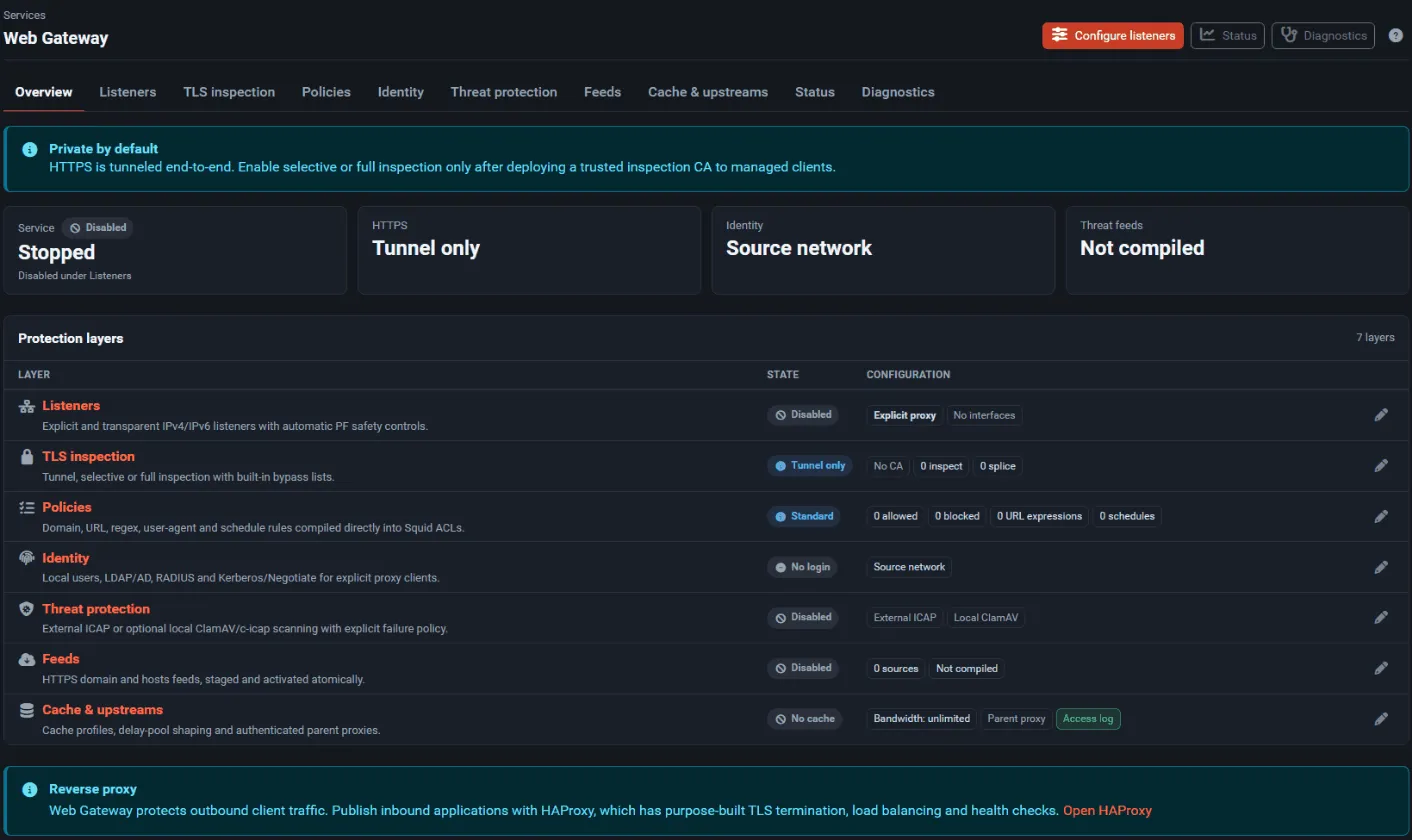
Tabs: Overview, Listeners, TLS inspection, Policies, Identity, Threat protection, Feeds, Cache & upstreams, Status, Diagnostics.
First-time setup
Section titled “First-time setup”Start with an explicit proxy and tunnel-only HTTPS. It needs no certificates on clients and is the easiest deployment to roll back.
- Open Services → Web Gateway → Listeners.
- Under Clients, select the internal interfaces whose clients may use the proxy. WAN and interfaces with a gateway are never offered.
- Under Listener modes, enable Explicit proxy and keep Local port 3128.
- Tick Enable under Gateway service and select Save and apply.
- On Policies, add a few test entries under Blocked, save, and use Simulate a decision to check the result for a host name.
- Download the PAC file from Listeners → PAC file and deploy it to a test group of managed
clients, or set the proxy (
<interface address>:3128) in the client. - Browse from a test client and watch Status → Web Gateway → Recent access log.
- Only after this works, consider TLS inspection, transparent interception or the antivirus scanner (see below).
Adding TLS inspection
Section titled “Adding TLS inspection”- Create a dedicated internal CA in System → Certificates (the CA must have its private key).
- Export its public certificate (the Export CA certificate button on the TLS inspection tab) and deploy it to managed clients only.
- On TLS inspection, choose Selective inspection, select the Signing CA, tick the Acknowledgement, and list the domains to inspect under Inspect in selective mode.
- Add certificate-pinned or mutual-TLS applications to Always splice.
- Move to Full inspection or Transparent HTTPS only after testing.
Settings reference
Section titled “Settings reference”Listeners
Section titled “Listeners”| Field | What it does | Default |
|---|---|---|
| Enable | Starts the gateway with the saved settings. Interception rules exist only while it is enabled (and, with fail-open, running). | Off |
| HA sync | Sends the gateway configuration to the HA peer through XMLRPC sync. Compiled feeds are rebuilt locally; CA private keys are not copied by this package. | Off |
| Client interfaces | Internal interfaces whose networks may use the gateway. | None |
| Additional client networks | Routed or VPN networks allowed to use the explicit proxy. Firewall pass rules are still required. | Empty |
| Explicit proxy + Local port | Squid listens on the selected interfaces’ addresses. | On, 3128 |
| Transparent HTTP + Local port | PF redirects TCP/80 from the selected interfaces to Squid on loopback. | Off, 3129 |
| Transparent HTTPS + Local port | PF redirects TCP/443; requires selective or full inspection. | Off, 3130 |
| HTTP/3 and QUIC | Allow UDP/443 or Block UDP/443 to force TCP fallback (transparent HTTPS only). | Allow |
| Proxy failure | Fail open removes redirects when Squid is down; Fail closed keeps them. | Fail open |
| PAC file | Download a PAC file for the explicit proxy. FreeSense does not publish an unauthenticated WPAD service. | — |
| Exemptions: Source addresses | Sources that are never redirected. | Empty |
| Exemptions: Destination addresses | Extra destinations that are never redirected. | Empty |
Every enabled listener must use its own port.
TLS inspection
Section titled “TLS inspection”| Field | What it does | Default |
|---|---|---|
| Mode | Tunnel only (CONNECT stays encrypted; host, SNI and IP policy only), Selective inspection, Full inspection. | Tunnel only |
| Signing CA | Internal CA with private key used to sign generated certificates. It is registered as in use, so Certificate Manager will not delete it. | None |
| Acknowledgement | Required for selective and full inspection. | Off |
| Inspect in selective mode | Domains to decrypt; a leading dot includes subdomains. | Empty |
| Always splice | Domains never decrypted, added to a built-in list (.apple.com, .icloud.com, .microsoftonline.com, .windowsupdate.com, .mozilla.org, .googleapis.com, .gstatic.com, .letsencrypt.org, .digicert.com, .globalsign.com). |
Empty |
Policies
Section titled “Policies”| Field | What it does | Default |
|---|---|---|
| Policy | Standard access (allow unless blocked) or Restricted allowlist (deny unless allowed). | Standard access |
| Always allowed | Domains that are always allowed; checked first. | Empty |
| Blocked | Domains blocked for HTTP and CONNECT/SNI without decryption. Active feed domains are merged in. | Empty |
| Blocked URL expressions | Regular expressions on the full URL. | Empty |
| Blocked user agents | Regular expressions on the User-Agent header. | Empty |
| Blocked response types | Regular expressions on the response MIME type. | Empty |
| Transfer limits | Maximum upload / Maximum download in MiB; 0 is unlimited. | 0 / 0 |
| YouTube | Adds the YouTube Restricted Mode header. | Off |
| Blocked schedules | Time windows in which matching traffic is blocked; format below. Matching traffic is blocked. | Empty |
Each Blocked schedules line is a name, the days (S M T W H F A) and a time range, separated by vertical bars:
school|MTWHF|08:00-15:00URL paths, MIME types, transfer limits, the YouTube header and response scanning only see HTTPS traffic for inspected destinations. Domain allow and block rules work without inspection.
Identity
Section titled “Identity”| Field | What it does | Default |
|---|---|---|
| Provider | Source network (no login), Local users (enabled, non-expired users of the local database), LDAP / Active Directory, RADIUS, Kerberos / Negotiate. Authentication requires an explicit listener. | Source network |
| Server | LDAP or RADIUS server from System → User Manager → Authentication Servers. | — |
| Realm | Text shown in the browser login prompt. | FreeSense Web Gateway |
| Credential TTL | Minutes before a client must authenticate again (1–1440). | 60 |
| Service principal / Keytab path | Kerberos settings. NTLM fallback is not supported. | — / /usr/local/etc/squid/freesense.keytab |
Threat protection
Section titled “Threat protection”| Field | What it does | Default |
|---|---|---|
| External ICAP: Enable | Send requests and responses to an external scanner or DLP service. | Off |
| REQMOD service URL / RESPMOD service URL | Complete icap:// or icaps:// URLs, no credentials. |
Empty |
| If the service fails | Bypass and alert or Block eligible traffic. | Bypass and alert |
| Scanning (local) | Scan with ClamAV through c-icap (icap://127.0.0.1:1344/squidclamav). Requires the companion package. When on, it takes the place of the external ICAP services. |
Off |
| Maximum scanned object | MiB, written into the managed block of squidclamav.conf. |
100 |
| If the scanner fails | Block (recommended) or Bypass and alert. | Block |
| Field | What it does | Default |
|---|---|---|
| Scheduled updates | Hourly cron job (minute 17) that updates feeds when the interval has passed. | Off |
| HTTPS feed URLs | Plain domain or hosts-format lists, one URL per line. No credentials in URLs. | Empty |
| Limits | Interval (1–720 hours), Maximum download (MiB), Maximum entries. | 24 h, 50 MiB, 1,000,000 |
| Update now | Compile the feeds immediately. | — |
Downloads are staged, normalized and deduplicated. If any feed fails or exceeds a limit, the last-known-good database stays active. FreeSense ships no feeds; choose providers yourself.
Cache & upstreams
Section titled “Cache & upstreams”| Field | What it does | Default |
|---|---|---|
| Cache: Profile | Disabled, Metadata / small objects (rock store), Download-oriented (ufs store). | Disabled |
| Sizes | Memory, disk and maximum object size in MiB. | 128 / 1024 / 64 |
| Bandwidth: Profile | Unlimited, Low-latency fairness, Balanced, Bulk transfer (Squid delay pools). | Unlimited |
| Forwarding headers | Remove X-Forwarded-For and Via. |
On |
| Access log | Keep /var/log/squid/access.log. |
On |
| Reports | Anonymize client identity: the access log records no client address or user name, and query strings are stripped. | On |
| Parent proxy | Host, port, username and password of an upstream proxy; Fallback prevents direct connections. The stored password is never shown again. | Off |
| Expert Squid directives | Extra directives, parser-tested. Directives that would replace listeners, includes, helpers, PID handling or the final access rule are refused. | Empty |
Firewall rules and interfaces
Section titled “Firewall rules and interfaces”- Explicit proxy: clients must reach the interface address on TCP 3128. The default LAN rule allows it; add a pass rule on other internal interfaces and for Additional client networks.
- Transparent HTTP/HTTPS: the package adds the NAT redirects itself, on the selected interfaces only. Traffic to private address ranges (RFC 1918, loopback, link-local, ULA), to client interface networks and to exempt destinations is not redirected.
- QUIC blocking: when selected, a
block quick ... port 443UDP rule labelled “FreeSense Web Gateway QUIC fallback” is added on the selected interfaces. - With Fail open, a watchdog (
freesense_webgateway_watchdog) checks Squid every 15 seconds and reloads the firewall when Squid goes up or down, so redirects disappear while Squid is down.
Service, logs, and status
Section titled “Service, logs, and status”| Item | Value |
|---|---|
| Service | freesense_webgateway (Squid), rc script /usr/local/etc/rc.d/freesense_webgateway |
| Watchdog | freesense_webgateway_watchdog, started only with a transparent listener |
| Antivirus services | clamav_freshclam, clamav_clamd, c-icap (started and stopped by the gateway) |
| Generated configuration | /usr/local/etc/squid/freesense.conf and /usr/local/etc/squid/freesense.d/ |
| State | /var/db/freesense-webgateway/ (feeds, previous configuration for rollback) |
| Logs | /var/log/squid/access.log, /var/log/squid/cache.log; activation errors go to the system log as “Web Gateway: …”, and the watchdog logs with tag freesense-webgateway |
| Feed updater | /usr/local/sbin/freesense-webgateway-feed-update [--force] |
Status → Web Gateway offers Start, Restart, Stop and Emergency disable. Emergency disable turns the gateway off in the configuration, stops the watchdog and Squid, and reloads the firewall so interception rules are removed. The Diagnostics tab shows the Squid configuration test result, the detected Squid version (7.x required) and the required helpers; it never writes files unless you select the confirmed regenerate action.
Upgrade, backup, and removal
Section titled “Upgrade, backup, and removal”- Settings live in
config.xmlunderinstalledpackages/webgatewayand are part of a normal backup. Generated files are rebuilt from them. - Removing the gateway disables it, stops Squid, the watchdog and the antivirus services, removes the feed cron job, reloads the firewall, and deletes generated files that can contain secrets (inspection CA key copy, local user file, RADIUS and LDAP secrets, and the generated configuration with parent-proxy credentials).
- Removing the antivirus companion turns local scanning off, saves that, reapplies the gateway and
removes its
Service squidclamavline fromc-icap.conf.
Troubleshooting
Section titled “Troubleshooting”| Symptom | Cause and fix |
|---|---|
| The gateway is stopped after a reboot | Known issue in 1.1.0: seen once after an upgrade-test reboot; the cause is not yet known. Start it from Status → Web Gateway. |
| Every request fails after enabling local scanning | Fixed in 1.1: squidclamav now uses the clamd socket from clamd.conf, Squid sends the client IP over ICAP, and clamd starts as soon as freshclam has the signatures. On a fresh enable, wait for the first signature download. |
Infected downloads redirect to proxy.domain.dom |
Fixed in 1.1: the placeholder redirect is commented out and squidclamav serves its own block page. |
| Save and apply reports that activation failed | Squid rejected the configuration or did not stay running. The previous files and settings were restored. Check Diagnostics and /var/log/squid/cache.log. |
| HTTPS policy for paths or MIME types has no effect | Those rules need inspection of that destination. |
| A banking or pinned application breaks under inspection | Add its domains to Always splice. |
| Clients on a VPN or routed network are denied | Add the network to Additional client networks and allow it in the firewall. |