

Fleet internet connectivity and quality
Fleet can watch the internet connection of every firewall, not only whether the firewall answers the controller. Each firewall already measures its gateways (latency, jitter and packet loss); with this option on, the controller keeps that history for the whole fleet and tells you when a connection goes bad. The option is off by default.
Turn it on
Section titled “Turn it on”-
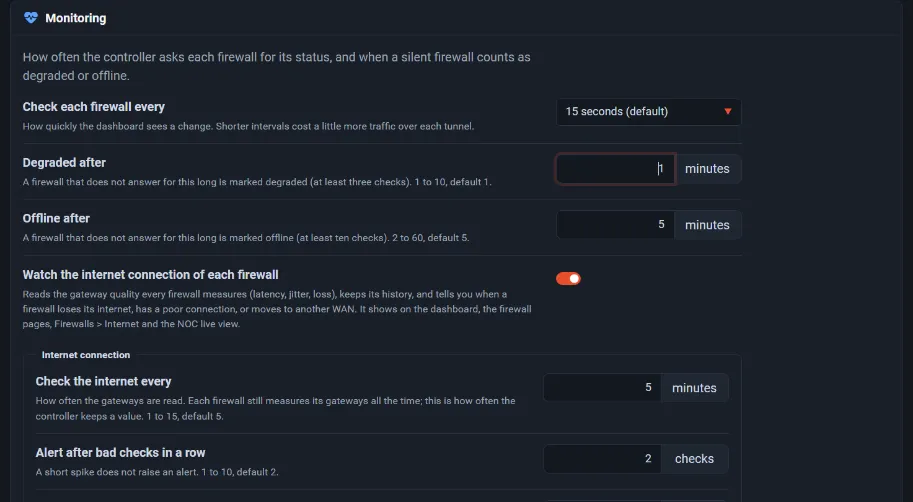
Open Settings → Monitoring and turn on Watch the internet connection of each firewall. The internet settings appear below it.
-
Check the thresholds:
Setting Default Check the internet every 5 minutes Alert after bad checks in a row 2 Poor connection at packet loss of 5 % No internet at packet loss of 20 %, or when the firewall marks the gateway down Poor connection at latency of 150 ms Poor connection at jitter of 30 ms Unstable connection above 4 changes per hour Upstream outage at 30 % of the firewalls (at least three) Keep the history of every gateway, not only the default one off -
Select Save. The first values appear within a few minutes.
Quality score and flaps
Section titled “Quality score and flaps”The quality score runs from 0 to 100: 100 is a clean, steady line. Packet loss weighs most, then flaps (the gateway changing between up, poor and down), then latency and jitter against the thresholds. 90 and above is excellent, 75 good, 50 unstable, and below 50 bad. Over a range (24 hours, 7 days or 30 days) Fleet also counts the minutes with loss.
Where you see it
Section titled “Where you see it”- Firewalls → Internet lists every gateway in the fleet with its state, latency, jitter and loss now, and for the chosen range its quality score, average loss, flaps and minutes with loss. Filter by state or group, search, and sort by lowest quality, most loss or most flaps.
- Firewalls → All firewalls shows the score and the current latency and loss under each firewall’s state.
- A firewall’s page → Stats → Internet shows quality per range, each gateway now, and the firewall’s failovers and outages.
- The Fleet icon in the top bar also counts firewalls without internet.
On a firewall with several WANs, the default gateway decides. When it is down and another gateway works, the firewall is shown as poor (default gateway down), and a change of default gateway is reported as a failover. Turn on Keep the history of every gateway to keep the history of the other gateways too.
Alerts
Section titled “Alerts”| Alert | When |
|---|---|
| A firewall lost its internet | The connection is down for the set number of checks |
| The internet of a firewall is poor (loss, latency or jitter) | Loss, latency or jitter is over its threshold |
| The connection of a firewall is unstable (flapping) | More changes per hour than the limit |
| A firewall moved to another WAN | The default gateway changed |
| The internet of a firewall works again | Only after a problem was reported |
| Many firewalls lost their internet at once (upstream outage) | At least three firewalls and the set share of the fleet lose their internet at once: one alert instead of one per firewall |
Choose these in an alert channel like any other alert.
In the live view
Section titled “In the live view”The live view gets an Internet status ring, an Internet
column in the firewall list with the score (Q 94) and, when there is a problem, the loss, and
these panels: Internet now, Internet quality (latency and loss charts), Connection
quality (lowest scores first), Worst internet connections, Internet availability and
Failovers and internet outages. A screen can beep when a firewall loses its internet.