

Fleet HA pairs
FreeSense Fleet finds firewalls that share CARP addresses and shows them as HA pairs. It can also set up a new pair from two managed firewalls: the shared addresses, state sync (pfsync) and configuration sync on both, in one wizard.
Fleet never works on both firewalls of a pair at once: the BACKUP goes first, and the MASTER only when its partner is back and the pair is healthy. Reboots and updates are held while the pair has a problem, such as both firewalls claiming MASTER.
Before you start
Section titled “Before you start”Fleet sets up a pair only when both firewalls are idle: a firewall with a queued or running operation (a reboot, an update) is refused with the name of that operation, because a reboot in the middle of a setup would undo it.
- Both firewalls are in the fleet with Managed access and not in another pair.
- Both have the same interfaces on the same networks.
- Both reach each other for state sync in one of two ways: a sync interface with an address,
ideally a direct link between the two (in the examples below an interface called SYNC with
10.252.0.2/24and10.252.0.3/24), or an encrypted link that Fleet makes between them, which needs no shared network and no cable.
Set up a pair
Section titled “Set up a pair”Firewalls → HA pairs → Set up a pair is a step-by-step guide. A bar at the top shows the steps, and Back keeps everything you chose.
- Firewalls. Choose the Primary (MASTER) and the Secondary (BACKUP), then select Read their interfaces. Fleet reads both firewalls. Two interfaces that share one network card on a firewall are named and not offered, because their addresses cannot be told apart.
- Shared addresses. Tick Share for each network that gets a shared (CARP) address. Fleet fills in the first free address; check that nothing else on the network uses it. Leave VHID on auto unless you need a fixed one.
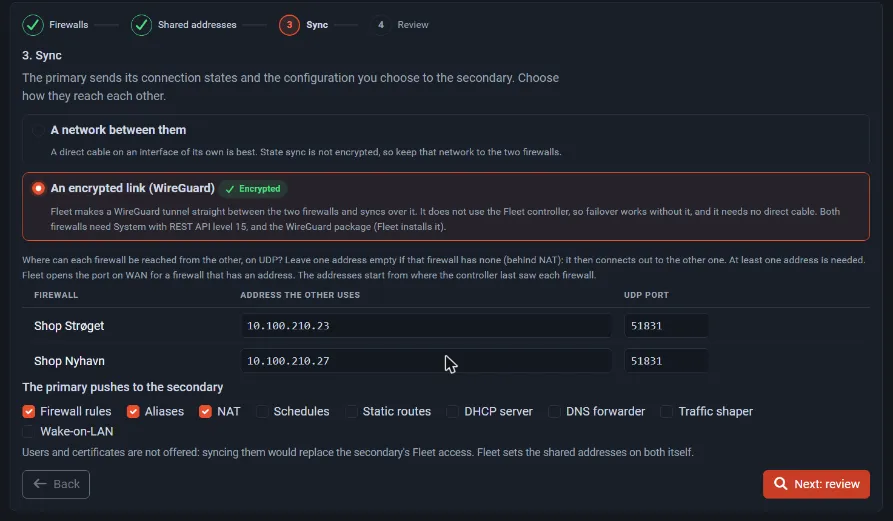
- Sync. Choose how the two firewalls reach each other: A network between them (the Sync interface) or An encrypted link (WireGuard). States (pfsync) and the configuration go over it. State sync (pfsync) is not encrypted, so a network between them should be a direct link. If you choose the WAN, or an interface that also carries a shared address, a warning on the review says that other devices could read the state sync. Then choose what configuration sync copies: firewall rules, aliases and NAT are on by default; schedules, static routes, DHCP server, DNS forwarder, traffic shaper and Wake-on-LAN are optional. Users and certificates are not offered: syncing them would replace the secondary’s Fleet access.
- Review. It lists what will happen on both firewalls. Nothing has changed yet. Select Set up … as a pair.
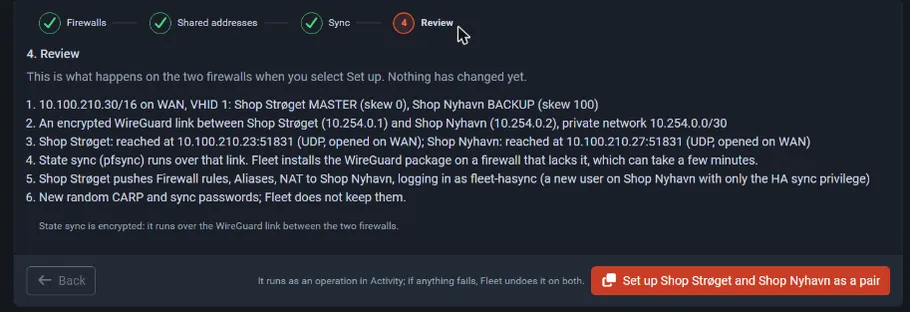
Fleet creates a user fleet-hasync on the secondary with only the HA sync privilege, and new
random CARP and sync passwords that it does not keep. Each firewall is changed under
commit-confirm: if anything fails, Fleet undoes the setup on both.
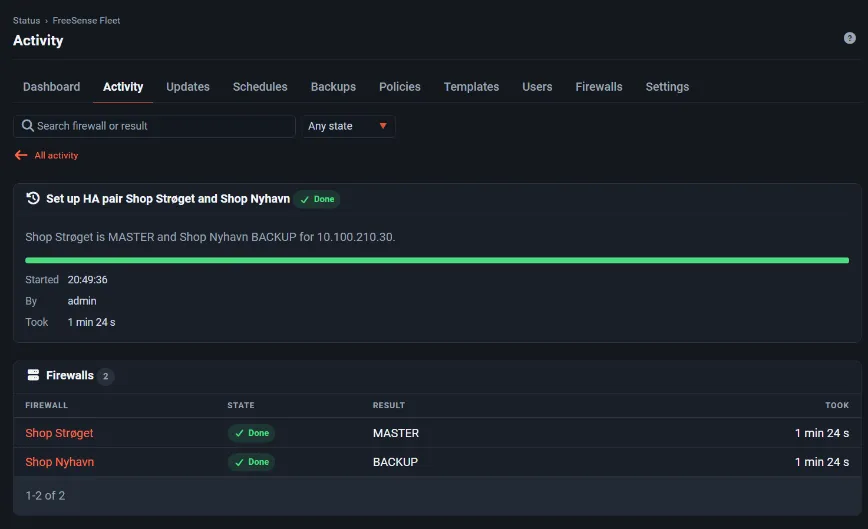
The setup runs as an operation in Activity. It takes about a minute:
When one firewall of a pair stops answering, for example after a power cut, Fleet reports the pair as Member down and says which firewall carries the shared addresses. It reports split-brain (both MASTER) or no MASTER only when the firewalls really say so, and it never calls a pair healthy while a member does not answer. An alert (An HA pair has two MASTERs, none, or a member down) is sent, and reboots and updates are held until the pair is healthy again.
The encrypted link
Section titled “The encrypted link”Choose An encrypted link (WireGuard) in the Sync step when the two firewalls have no direct cable between them, or when the network between them is not yours alone. Fleet makes a WireGuard tunnel straight between the two firewalls and runs state sync over it. It is separate from the Fleet tunnel to the controller, so failover still works when the controller is down.
- Addresses. For each firewall, give the address the other one reaches it on, and a UDP port
(default 51831). The address starts from where the controller last saw the firewall connect
from; check it. Leave one address empty if that firewall has none, for example behind NAT: it
then connects out to the other one. At least one address is needed. Fleet makes two rules on
each firewall’s WAN for the link’s UDP port (one in, one out, both marked
[Fleet:HA]and without state; see the note below), so the port is open on the firewall that waits and answers on the one that connects out. - The link. Fleet picks a free private /30 from
10.254.0.0/16that neither firewall uses, and keeps the two ends’ keys on the firewalls: a private key never leaves its firewall. The link shows on each firewall as an interface called HALINK and under VPN → WireGuard. - WireGuard package. A firewall without the FreeSense WireGuard package installs it from the package repository, which needs internet and can take a few minutes.
- Requirements. Both firewalls need FreeSense with REST API level 15 (Development builds from the release that adds this). The setup refuses older ones and says to update first.
- If it fails. The two firewalls must see each other within 90 seconds. If they do not, the setup stops with FLEET-E602, names the addresses to check on UDP and undoes everything on both.
The rules for the link, and for state sync itself, are stateless on purpose. With states, pfsync would sync the states of its own packets and every pfsync packet would cause another: a storm of millions of packets right after setup. With them, state sync starts with one short exchange of the state table (about 2 MB for a small firewall) and then goes quiet. Fleet loads these rules before state sync starts, and drops the link’s old states when it removes a link.
State sync over the link is encrypted. The configuration sync still goes to the secondary’s WebGUI over the link, with the certificate pinned as before.
The pair list
Section titled “The pair list”Firewalls → HA pairs shows each pair with the role of each firewall, its state, the shared addresses with their VHID, and where configuration sync comes from.
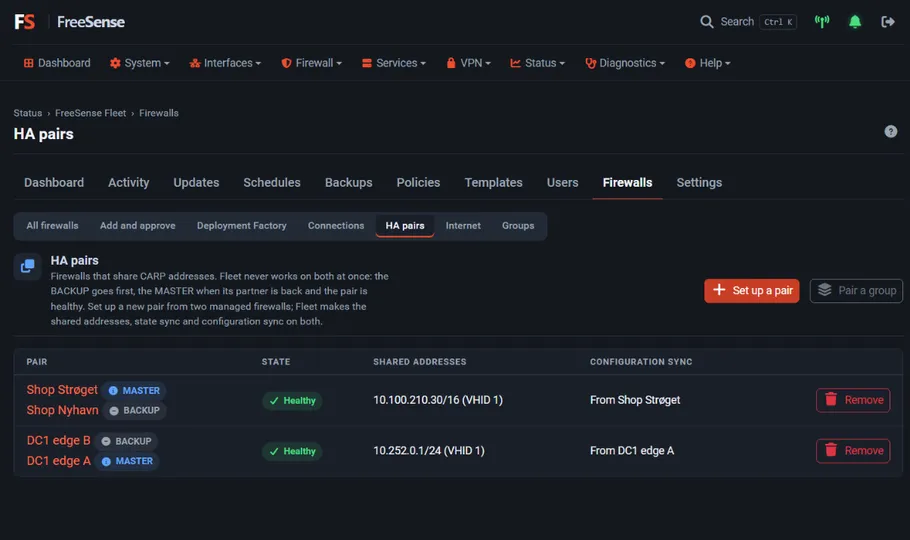
Pair a group sets up several pairs from one group. HA pairs also appear in the live view, with the role of each member and the last change.
Remove a pair
Section titled “Remove a pair”Remove on a pair removes what Fleet set up for it, on both firewalls, the BACKUP first: the
shared addresses, the state and configuration sync settings, the rules marked [Fleet:HA], the
fleet-hasync user and the encrypted link. The two firewalls keep their own addresses and
settings; the shared addresses stop answering, so clients that use them lose the service until
you point them elsewhere. It runs as an operation in Activity.
A pair that was not set up by Fleet only loses what Fleet recognises as its own, which can be nothing. Remove it by hand on the firewalls in that case.