

REST API overview
FreeSense 1.1 includes a REST API (version 1) for automation and monitoring. It is new in 1.1; FreeSense 1.0.x has no REST API.
The API covers the same ground as the WebUI. Each endpoint reuses the code of the WebUI page it mirrors, so a change sent through the API is validated and saved exactly like the same change made on that page. API access follows the existing user and group privileges: an API key acts as one local user and can do what that user may do in the WebUI, or less.
- Getting started walks through a first key and the first requests.
- The API reference lists every endpoint of the base system, grouped by permission area.
At a glance
Section titled “At a glance”| Item | Value |
|---|---|
| Base path | /api/v1/ on the WebGUI address and port, for example https://192.168.1.1/api/v1/ |
| Format | JSON request bodies and JSON responses (Content-Type: application/json) |
| Authentication | Authorization: Bearer fsk_<id>_<secret> (an API key) |
| Transport | HTTPS only by default; plain HTTP only when Allow HTTP is enabled |
| Machine-readable description | OpenAPI 3.0.3 document at GET /api/v1/openapi.json |
| Feature detection | GET /api/v1/meta returns the API level (8 in 1.1.0) and a list of capabilities |
| Settings menu | System → REST API |
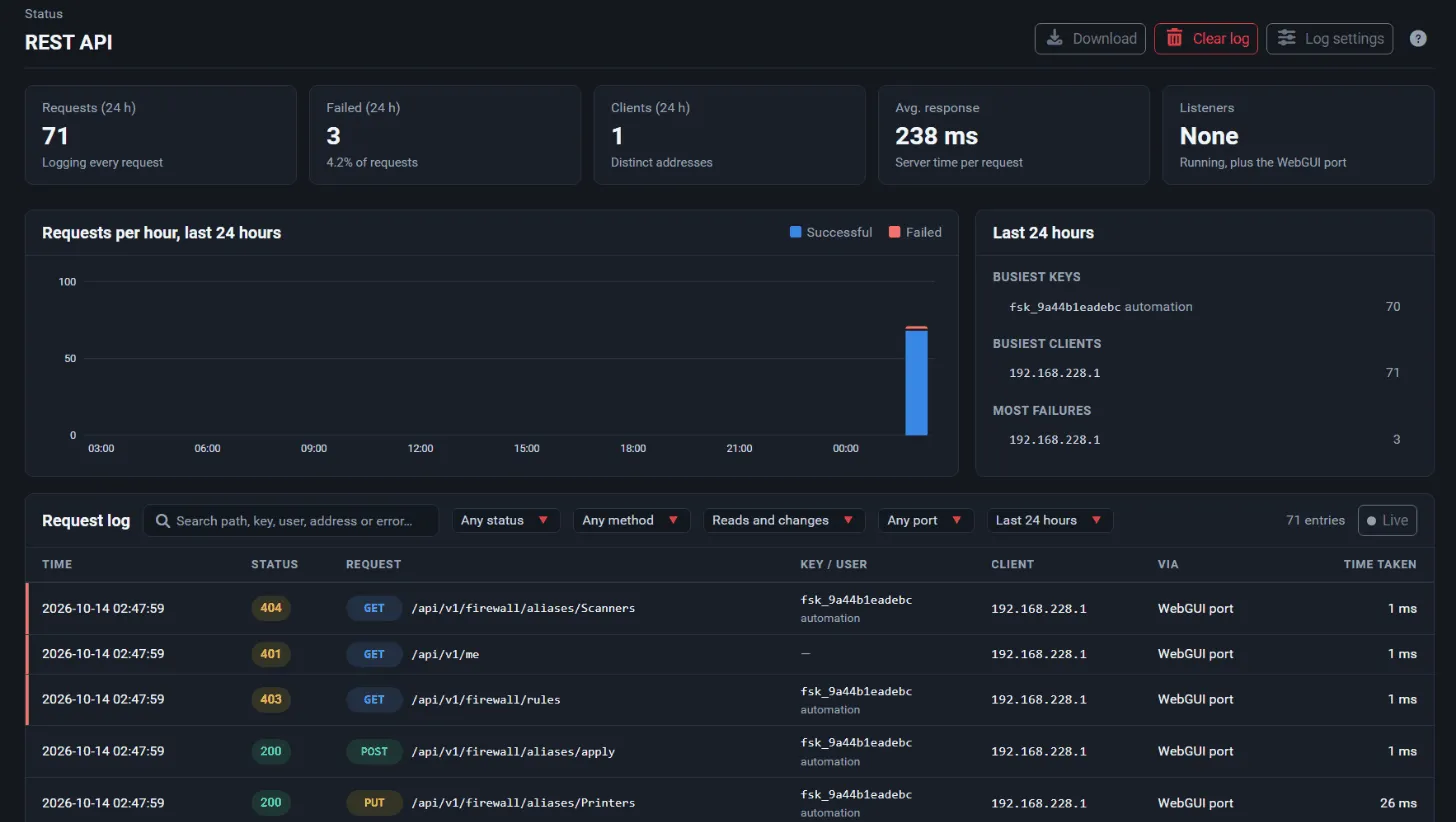
| Activity and request log | Status → REST API |
Optional packages can add their own endpoints. They then appear in the OpenAPI document and in the API Explorer on that firewall, but not in the reference on this site.
Enable the API
Section titled “Enable the API”The API is off until an administrator enables it.
- Open System → REST API (the Settings tab).
- Under General, check Enable (“Enable the REST API at /api/v1/”).
- Leave WebGUI port checked to serve the API on the WebGUI port. Uncheck it to serve the API only on dedicated listeners.
- Under Access, optionally enter Allowed networks: addresses or networks, separated by spaces, that may use the API (for example
192.168.1.0/24 2001:db8::/48). Empty allows any address that can reach the WebGUI or a listener. The firewall rules still apply in addition. - Leave Allow HTTP unchecked. API keys are sent with every request, so plain HTTP exposes them. Requests from the firewall itself (
127.0.0.1or::1) are accepted over HTTP regardless. - Choose what the Request Log records (see Logging) and select Save.
While the API is disabled, every request answers 404 with the error code api_disabled. Keys can still be created, but they only work once the API is enabled.
The System → REST API page has these tabs, each shown only to users who may open it: Settings, Listeners, All Keys, My API Keys, Guide and API Explorer.
Authentication with API keys
Section titled “Authentication with API keys”Every request carries an API key in the Authorization header:
GET /api/v1/me HTTP/1.1Host: 192.168.1.1Authorization: Bearer fsk_0123456789ab_<43-character secret>The key format is fsk_<id>_<secret>: a 12-character hexadecimal key ID and a 43-character URL-safe random secret. The scheme word Bearer is not case-sensitive; the key is.
How keys are handled:
- Shown once. The full key is displayed only right after it is created and cannot be recovered later. FreeSense stores only the SHA-256 hash of the secret in the configuration.
- Owned by a local user. A key belongs to one enabled local user and acts as that user. Keys are available to local users only, not to LDAP or RADIUS users.
- Options per key. Each key has a required Description (up to 120 characters), an optional Read-only flag, optional Scopes that limit it to selected areas, and an optional expiry (Expires after (days), 1 to 3650; empty means never).
- Limit. A user can have at most 20 keys, revoked keys included. Delete keys that are no longer needed.
- Last use. The time and client address of each key’s last use are shown in the key lists. They are kept outside the configuration (in
/var/db/restapi_last_used.json), so API use does not create configuration revisions.
Where keys are managed
Section titled “Where keys are managed”| Page | Who uses it | What it does |
|---|---|---|
| System → REST API → My API Keys | Any user with REST API access | Create, revoke and delete your own keys. |
| System → REST API → All Keys | Administrators (the “WebCfg - System: REST API” privilege) | Every user’s keys: create a key for any user who has REST API access, filter by user, and revoke or delete several keys at once. |
A user can also revoke all of their own keys with DELETE /api/v1/me/api-keys, including the key making the request.
Revoke, delete and expire
Section titled “Revoke, delete and expire”- Revoke stops a key at once and for good. A revoked key stays listed, with its last use, until it is deleted.
- Delete removes the key from the list.
- An expired key, a key whose user is disabled, deleted or past the account expiry date, and a key whose user lost REST API access all stop working.
Failed authentication
Section titled “Failed authentication”A missing, malformed, unknown, expired or revoked key answers 401 with the error code unauthorized and a WWW-Authenticate: Bearer realm="FreeSense" header. Failed attempts are written to the authentication log in the same format as failed WebUI logins, so login protection blocks clients that keep guessing.
Access control
Section titled “Access control”Three checks decide whether a request is allowed.
1. REST API access
Section titled “1. REST API access”A key works only while its user holds the WebCfg - System: REST API access privilege (page-system-restapi-keys), directly or through a group. Without it, requests answer 403 with the code api_access_denied. The same privilege allows the user to manage their own keys and to open the API Explorer. It grants nothing else: the API still allows only what the user’s other privileges allow.
Grant it in System → User Manager: edit the user (or one of its groups) and use Add privilege. The user’s edit page shows a REST API line under Effective Privileges with “Allowed” or “Not allowed” and the number of keys.
2. The endpoint’s scope
Section titled “2. The endpoint’s scope”Every endpoint belongs to a permission area and is either a read or a write, which gives its scope, for example firewall.aliases:read or firewall.aliases:write. A user holds a scope when either:
- the user may open the WebUI page the endpoint mirrors (WebUI access implies API access to the same thing), or
- the user holds the API privilege for the area: REST API - <area>: read or REST API - <area>: write (
api-<area>-read/api-<area>-write). A write privilege includes read.
The REST API - ... privileges grant no WebUI access at all. Use them to build API-only service accounts that cannot sign in to the WebUI pages they automate. The reference lists the scope, the WebUI page and the API privileges for every endpoint. The administrator account (admin, uid 0) and users with WebCfg - All pages hold every scope.
A user who lacks the scope gets 403 with the code forbidden; the message names the scope, the WebUI page and the API privilege that would grant it.
The 26 permission areas are:
| Area | Covers |
|---|---|
system |
System information |
status |
Status (interfaces, gateways, services, ARP, DHCP leases) |
config |
Configuration history and revert |
backup |
Remote backups |
firewall.aliases |
Firewall aliases |
firewall.rules |
Firewall rules |
firewall.nat |
Firewall NAT (port forward, 1:1, outbound, NPt) |
firewall.schedules |
Firewall schedules |
firewall.vips |
Firewall virtual IPs |
routing |
Gateways and static routes |
interfaces |
Interfaces (VLAN, VXLAN, GIF, GRE, LAGG, QinQ, bridges, groups, assignments) |
services.dns |
DNS Forwarder and DNS Resolver |
services.misc |
UPnP IGD & PCP, Wake-on-LAN, IGMP Proxy, SNMP, DHCP/DHCPv6 Relay |
services.time |
NTP server |
services.ddns |
Dynamic DNS and RFC 2136 clients |
services.dhcp |
DHCP and DHCPv6 servers, static mappings and router advertisements |
vpn.ipsec |
IPsec |
vpn.l2tp |
L2TP VPN server and users |
vpn.openvpn |
OpenVPN servers, clients and client-specific overrides |
pki |
Certificates, certificate authorities and revocation lists |
users |
Users, groups, privileges and authentication servers |
system.settings |
General setup, high availability, update settings, admin access, advanced firewall, networking, miscellaneous, notifications, tunables |
logs |
System logs (read) |
packages |
Packages and system version (lists, update check, install, reinstall, remove, system update) |
diagnostics |
Ping, traceroute, DNS lookup, states |
operations |
Service start/stop/restart, state table reset, reboot, halt |
A few endpoints (/api/v1/me and its sub-paths, /api/v1/meta, /api/v1/openapi.json and /api/v1/batch) belong to no area and are open to any valid key. GET /api/v1/schema/{area}/{name} also belongs to no area, but checks the privilege of the editor page the schema describes.
3. The key’s own limits
Section titled “3. The key’s own limits”A key can only narrow what its user holds, never extend it:
| Key setting | Effect | Error |
|---|---|---|
| Scopes: Only the scopes selected below | The key may call only endpoints whose area and action were selected. A selected write scope includes read. | 403 scope_not_granted |
| Read-only | Every write endpoint is refused. | 403 read_only_key |
Two more write restrictions apply regardless of the key: a user with User - Config: Deny Config Write cannot make changes through the API (403 read_only_user), and a listener set to read-only refuses writes (403 listener_read_only). Some endpoints additionally require an administrator (the admin user or WebCfg - All pages), for example installing packages, starting a system update and managing boot environments (403 admin_required).
To see what a key can actually do, call GET /api/v1/me. It returns the user, the key’s settings (readonly, expires, limited_to_scopes), the effective_scopes and the list of endpoints the key may call.
Requests and responses
Section titled “Requests and responses”Request format
Section titled “Request format”- Path parameters are part of the URL, for example
/api/v1/firewall/aliases/{name}. They may be URL-encoded (for exampleuser%40example.com); a decoded slash or control character is refused with404. - Query parameters are used for options such as
?apply=true,?refresh=trueor log filters. POST,PUT,PATCHandDELETEtake an optional JSON object as the body. An empty body counts as{}. Anything else (invalid JSON, a JSON list) answers400 invalid_json.- A trailing slash on the path is ignored. An unknown path answers
404 not_found; a known path with another method answers405 method_not_allowedand names the allowed methods.
Success responses
Section titled “Success responses”A successful JSON response wraps the result in data. Some list endpoints add a meta object (for example cursors or totals):
{ "data": { "hostname": "firewall", "domain": "home.arpa", "version": "1.1.0" }}Status codes used on success: 200 (OK), 201 (an object was created) and 202 (a background operation was started, such as a package installation, a system update or a reboot). A few endpoints return other media types, such as a configuration revision as application/xml or a diff as text/plain; the reference marks them.
Every response carries Cache-Control: no-store and an ETag header for the running configuration (see Concurrent changes).
Errors
Section titled “Errors”Every error has the same shape:
{ "error": { "code": "validation_failed", "message": "The request failed validation.", "details": { "messages": ["<the WebUI's validation message>"], "fields": { "name": "<the WebUI's validation message>" } } }}code is a stable, machine-readable string; message is a readable explanation; details is present only when there is more to say.
| Status | Meaning | Typical codes |
|---|---|---|
400 |
Invalid input: bad JSON, unknown or malformed fields, wrong types, a missing confirmation | invalid_json, invalid_field, unknown_field, missing_field, invalid_parameter, confirm_required, confirmation_required |
401 |
Missing, malformed, unknown, expired or revoked key | unauthorized |
403 |
Not allowed: no REST API access, missing scope, key limits, HTTPS or source address rules | api_access_denied, forbidden, scope_not_granted, read_only_key, read_only_user, admin_required, https_required, source_not_allowed, listener_read_only |
404 |
No such object or endpoint, or the API is not served here | not_found, api_disabled, not_on_webgui, listener_disabled |
405 |
Known path, wrong method | method_not_allowed |
409 |
Conflict with the current state: the object is in use, protected or locked, or another operation is running | in_use, exists, protected, locked, packages_busy, update_busy, operation_running, no_update, boot_environment_in_use |
412 |
The configuration changed since the ETag sent in If-Match |
config_changed |
422 |
The WebUI validation refused the input | validation_failed |
429 |
Rate limit of an API listener exceeded | (sent by the listener) |
500 |
Internal error; the details are in the system log | internal_error, save_failed |
502 |
An external step failed (package repository, version check, remote storage) | repository_error, version_check_failed, storage_error |
About 409 conflicts: they mean the request is valid but the firewall’s current state does not allow it. Examples: deleting an alias that a rule still references (in_use), changing packages while another package operation is running (packages_busy), checking for updates while the update system is busy (update_busy), or activating a ZFS boot environment that holds an older release (locked). Retry after the conflicting operation has finished, or resolve the dependency first.
About 422 validation errors: the WebUI’s own validation messages are returned in details.messages. When the endpoint has a form schema, details.fields also maps messages to the field they are about (for example name, or entries.2.address for a row in a list), so a client can show each message next to its field.
Concurrent changes: ETag and If-Match
Section titled “Concurrent changes: ETag and If-Match”Every response includes an ETag header that identifies the running configuration. Send it back in an If-Match header on a write request to have the change refused with 412 config_changed if anyone changed the configuration in the meantime. This matters most for objects addressed by their position, such as filter rules, port forwards, virtual IPs and static routes: their id is their position in the configuration and shifts when entries are added or removed.
Staging and applying changes
Section titled “Staging and applying changes”Most firewall and service changes are staged like in the WebUI: they are saved to the configuration, but take effect only when applied.
- Add
?apply=trueto a write request to apply the change at once. - Or make several changes and apply them together with the area’s apply endpoint, for example
POST /api/v1/firewall/aliases/apply,POST /api/v1/firewall/nat/applyorPOST /api/v1/firewall/rules/apply. GET /api/v1/firewall/pendinglists the firewall areas with pending changes (rules,nat,aliases,virtual_ips), andPOST /api/v1/firewall/applyapplies all of them in one filter reload.
Some changes are not staged and take effect when saved, just as on their WebUI page (for example interfaces such as VLANs and VXLANs, schedules, users and certificates); the reference notes “applied at once” in their descriptions. The API Explorer labels every write endpoint as staged, applies or no staging.
Confirmation for disruptive operations
Section titled “Confirmation for disruptive operations”Interface assignments, service start/stop/restart, state table resets, reboot, halt, package installation and removal, the system update and configuration restore require {"confirm": true} in the request body. Without it they answer 400.
Long-running operations
Section titled “Long-running operations”Package installation, reinstallation and removal and the system update run in the background. They answer 202 Accepted immediately; follow their progress with GET /api/v1/packages/operation (state, return code, progress and log). Only one package operation can run at a time; others answer 409.
Batch requests
Section titled “Batch requests”POST /api/v1/batch runs up to 20 GET requests in one call. Each sub-request is authorized and answered as if it were sent alone, and one failing sub-request does not fail the others.
{ "requests": [ { "id": "info", "method": "GET", "path": "/api/v1/system/info" }, { "id": "gw", "method": "GET", "path": "/api/v1/status/gateways" } ]}The response data is a list of {id, status, body}. Batches accept only GET requests to /api/v1 endpoints that return JSON.
Pagination and filtering
Section titled “Pagination and filtering”There is no general pagination: list endpoints return the complete list. Exceptions:
- The log endpoints (
/api/v1/logs/...) takelines(1 to 2000, default 50),filter(a case-insensitive regular expression),format(parsed,raworwebui) and the cursorsafterandbefore(entry IDs); the firewall log adds field filters such asinterface,action,srcipanddstport. Cursor information is returned inmeta. - Some endpoints take their own filters, such as
?interface=onGET /api/v1/firewall/rules, orqon a repository’s package list.
The reference lists the query parameters of each endpoint.
Dedicated API listeners
Section titled “Dedicated API listeners”The Listeners tab adds extra HTTPS ports that serve only /api/ (every other path answers 404). Use them to reach the API, for example from another site, without exposing the WebGUI. Each listener:
- binds to the addresses of one interface, a virtual IP or localhost, on its own port (default
8443; the WebGUI and SSH ports are refused); - uses a certificate from System → Certificates that has a private key, with TLS 1.2 or 1.3 only;
- can be read-only, can have its own Allowed networks (replacing the general list), and can optionally add a firewall rule that passes the port on its interface;
- has a per-client rate limit in requests per second (default
10,0turns it off, at most1000), with a burst of twice the rate; requests beyond it answer429.
Each listener runs in its own nginx instance, so a listener that cannot start does not affect the WebGUI or other listeners. At most 16 listeners can be configured. Listeners stop while the API is disabled.
The WebGUI port has no API rate limit of its own; login protection still applies to failed authentications.
Logging and auditing
Section titled “Logging and auditing”- Request log. System → REST API → Settings → Request Log chooses what is recorded: Nothing, Failed requests (4xx and 5xx) (the default), Changes and failed requests, or Every request. Each entry has the time, client address, method, path, status, duration, key ID, user and listener; never a request body, a query value or a key secret. Entries are kept for 30 days and up to 10 MB by default (Clean up: 1 to 365 days, 1 to 500 MB). View it under Status → REST API. The log file is
/var/log/restapi.log. - Authentication log. Failed authentications are always written to the authentication log, independent of the request log setting.
- Configuration history. Changes made through the API appear in Diagnostics → Backup & Restore → Configuration History with the user and
API key <id>as the source.
The API Explorer and the Guide
Section titled “The API Explorer and the Guide”System → REST API → API Explorer lists every endpoint available on this firewall, including endpoints added by installed packages, grouped by area. For each endpoint it shows the method, path, scope, WebUI page, parameters and body, and whether the signed-in user could call it. Try it sends a real request from the browser to /api/v1 with an API key that you paste; the key stays in the browser (in memory, or optionally in sessionStorage until the tab closes). Write requests ask for confirmation before they are sent. Download openapi.json saves the same document as GET /api/v1/openapi.json without needing a key.
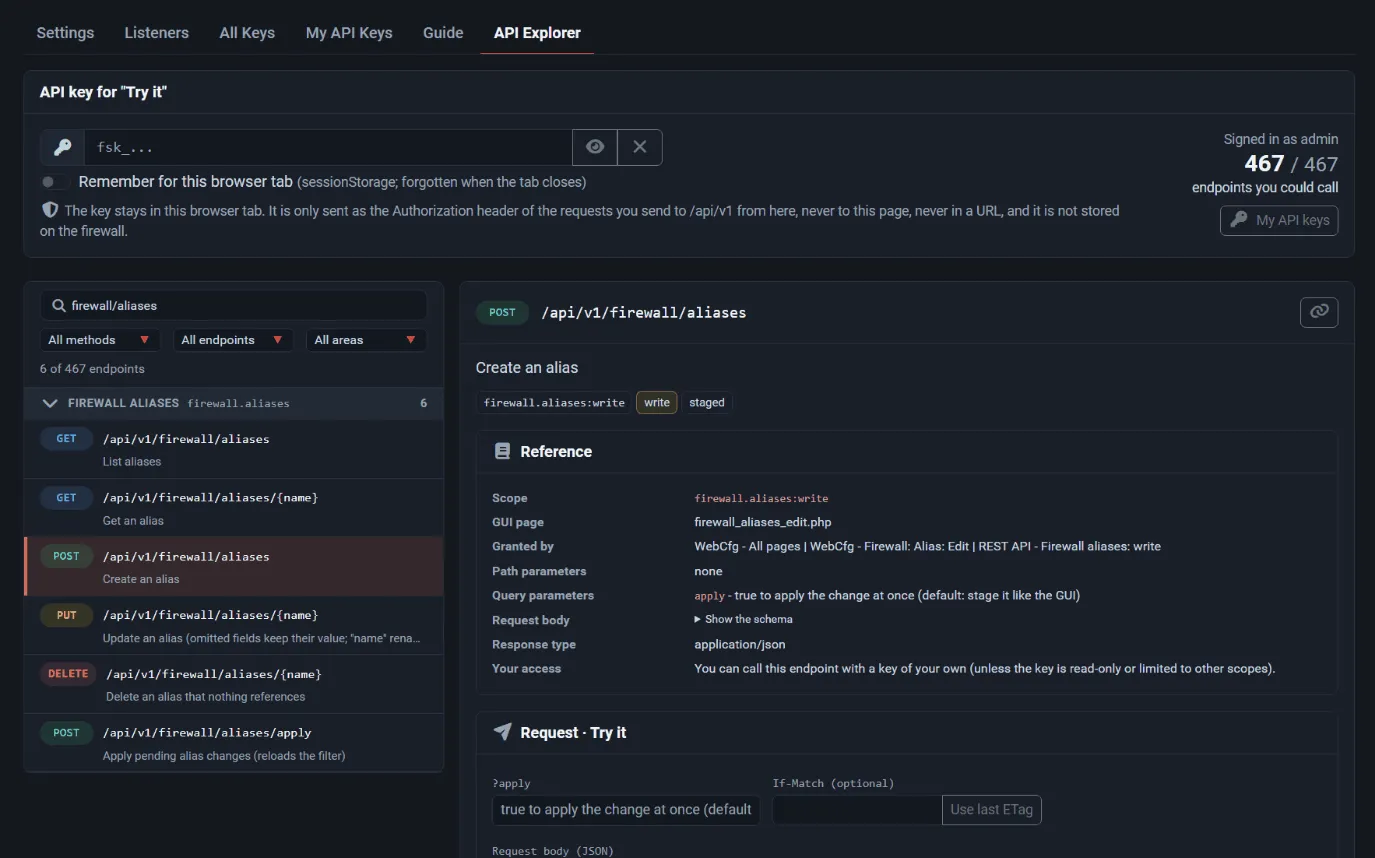
“Try it” uses the WebGUI port. If the API is served only on listeners, the Explorer can show the reference but cannot send requests.
System → REST API → Guide is a short in-product summary of keys, scopes, staging and error codes.
Opening the Explorer needs the WebCfg - System: REST API access privilege (or WebCfg - System: REST API explorer, which shows the reference without granting API use).
OpenAPI document
Section titled “OpenAPI document”GET /api/v1/openapi.json returns an OpenAPI 3.0.3 description of every endpoint on the firewall, for API clients and code generators. Each operation carries the extensions x-freesense-scope (its scope) and x-freesense-privilege-page (the WebUI page that grants it). The document needs a valid API key.
Versioning
Section titled “Versioning”All endpoints are under /api/v1/. Within v1, new endpoints and response fields are added over time; GET /api/v1/meta reports the api_level (8 in FreeSense 1.1.0) and a list of capabilities, so a client can check that the features it needs are present. No further compatibility promise is documented for v1.
Security guidance
Section titled “Security guidance”- Use HTTPS and verify the certificate. Keep Allow HTTP off. Give the WebGUI (or the listener) a certificate your clients trust, or pin the firewall’s certificate in the client, instead of disabling certificate checks.
- Restrict who can connect. Set Allowed networks to the management hosts that need the API, and keep the WebGUI and listeners off untrusted interfaces. For remote automation, prefer a read-only listener with its own allowed networks and a rate limit.
- Use dedicated, least-privilege users. Create one local user per integration, grant WebCfg - System: REST API access plus only the
REST API - <area>privileges it needs, and do not use theadminaccount for automation. Use read-only keys for monitoring. - Limit keys further. Limit keys to scopes, set an expiry, and give each key a description that says where it is used.
- Rotate keys. Create the new key, update the client, confirm in the key list that the old key is no longer used (its last use stops changing), then revoke and delete the old key.
- Protect key material. Store keys in a secret manager or environment variables, not in scripts or version control. A key in a shell history or log is compromised; revoke it.
- Watch the logs. Set the request log to at least Changes and failed requests for integrations that write, and review Status → REST API and the authentication log.