

Interfaces, VLANs, bridges, and VXLAN
Interfaces define the trust boundaries that every firewall rule, NAT mapping, DHCP scope, and VPN route depends on. Assign and test them before importing complex configuration or adding packages. For the concepts and the full list of interface types, see interfaces and networking.
Recommended order
Section titled “Recommended order”- Assign a trusted LAN and confirm WebUI access through it.
- Configure WAN addressing and a default gateway.
- Create VLANs, bridges, LAGGs, or tunnels, then assign them as interfaces.
- Add interface addresses, DHCP scopes, and DNS settings.
- Add firewall rules per interface.
Assign an interface
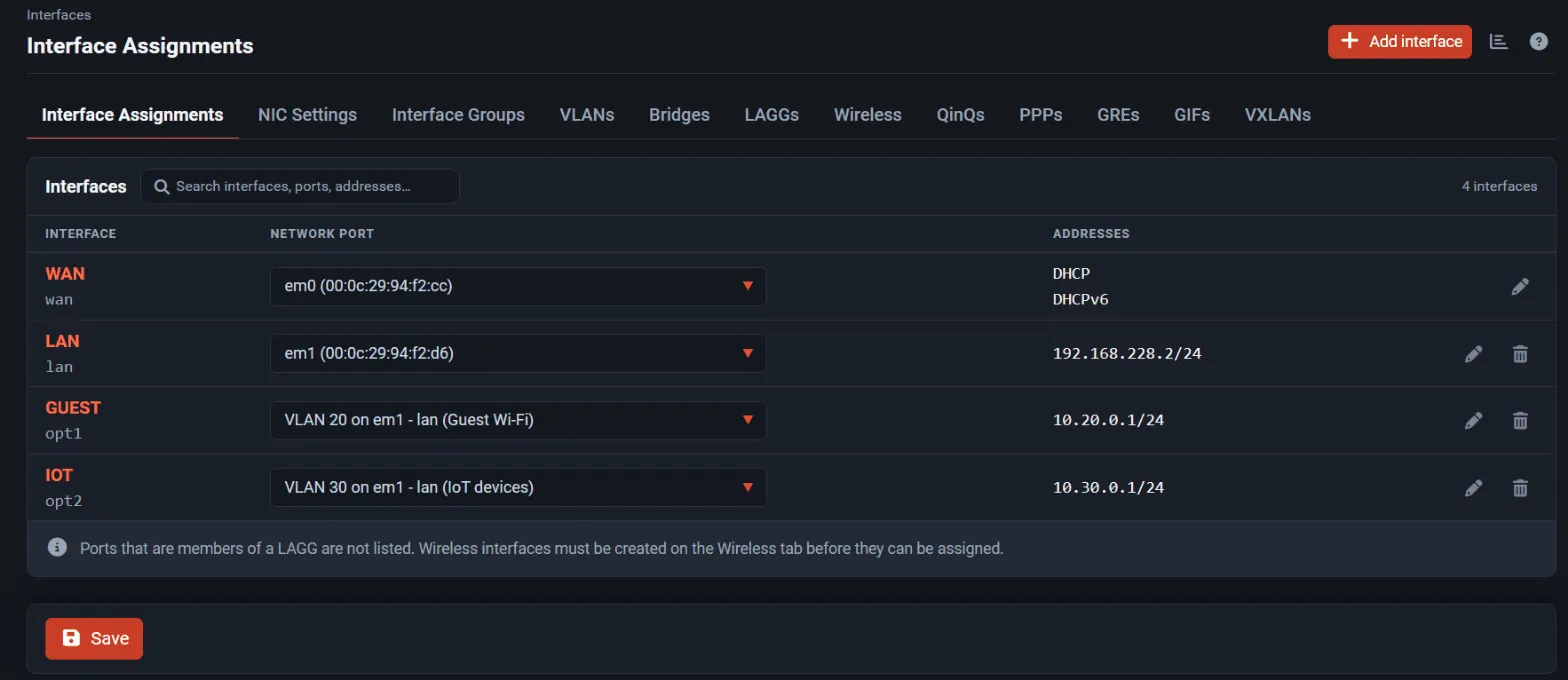
Section titled “Assign an interface”- Open Interfaces → Assignments.
- To add an interface, select Add interface, choose the Network port, and select Add.
The new interface is named
OPTnand starts disabled. - To move an existing interface to another port, change its port selector in the list. Changed ports and ports used twice are marked; select Save to keep the change, then Apply Changes if the page asks for it.
- Select Edit (or the interface’s entry in the Interfaces menu), tick Enable interface, set a Description, choose the IPv4 and IPv6 configuration types, and save.
- Select Apply Changes.
Use the search field above the list to find an interface by name, port, or address. If a LAGG member port is missing from the selector, that is expected: assign the LAGG instead.
Adjust link settings
Section titled “Adjust link settings”Open the interface (for example Interfaces → LAN) and expand Link Settings:
- MAC Address: only when an upstream device is bound to a specific MAC address. For a VLAN, set it on the parent interface.
- MTU: leave blank for the adapter default. Members of a bridge use the bridge MTU.
- MSS: set when a tunnel or PPPoE link needs TCP MSS clamping.
- Speed and Duplex: leave on autoselect unless the switch port is forced to a fixed speed and duplex. A mismatch causes errors and poor throughput.
Tune adapter offloads
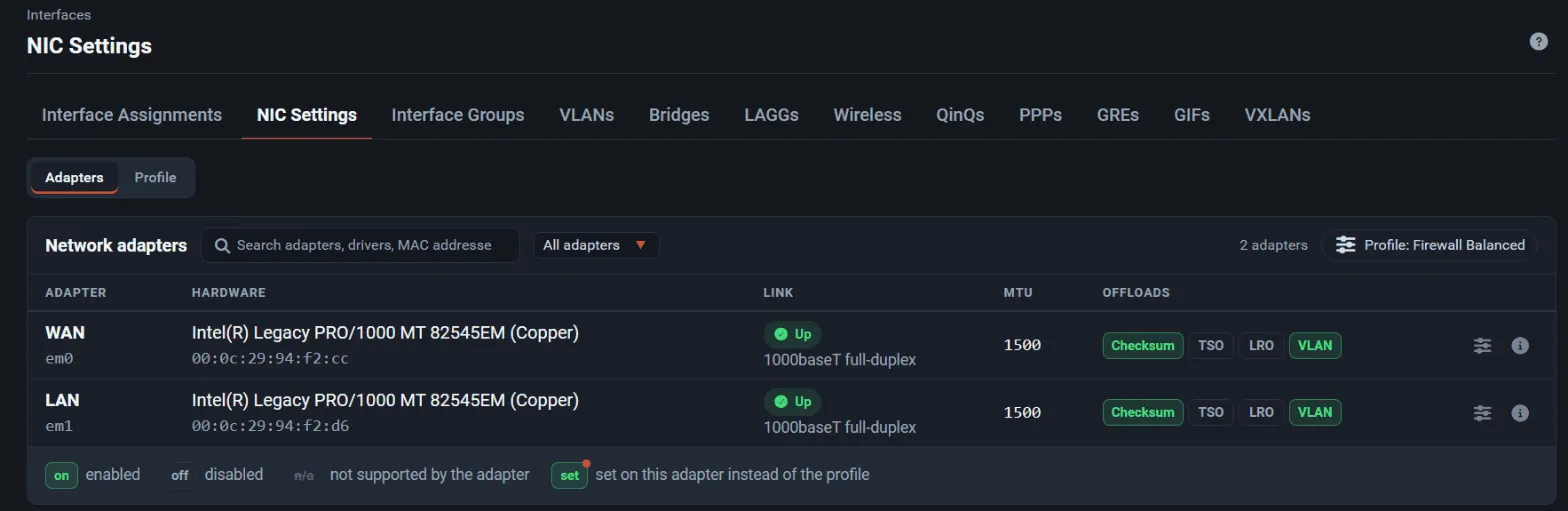
Section titled “Tune adapter offloads”Open Interfaces → NIC Settings.
- Check the Link column: it shows the negotiated speed and duplex for each adapter, such as
1000baseT full-duplex. An unexpected value usually means a cable, transceiver, or switch-port problem. - Leave the Profile on Firewall Balanced unless you have a reason to change it. Select Packet Capture / Troubleshooting while you validate traffic with a packet capture, then switch back.
- To override one adapter, select Configure on its row, set the offload to On or Off, or set an adapter MTU, and select Save and apply. Only that adapter is changed.
Applying can interrupt traffic on the adapter for a moment. A Realtek adapter with unexplained drops or corruption is a common case for turning checksum offload off.
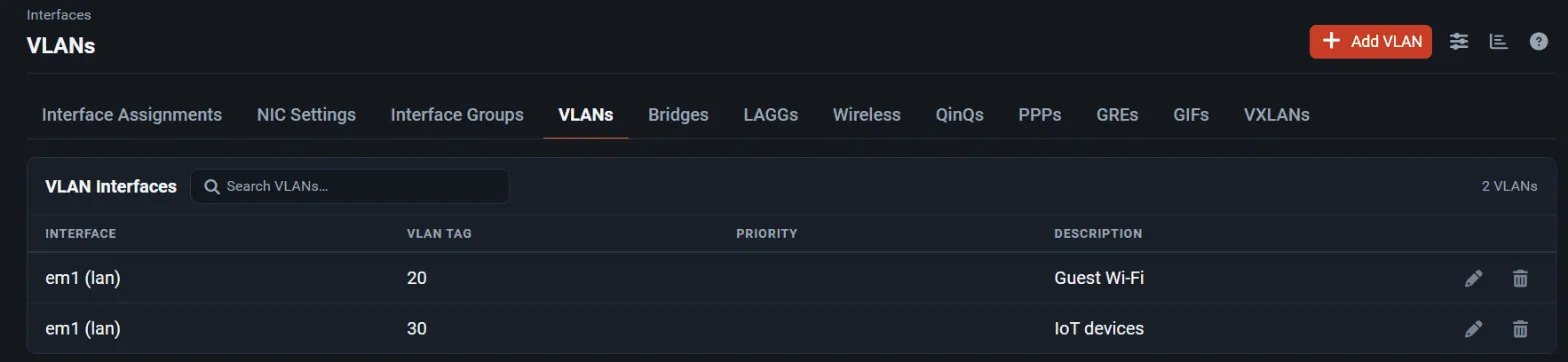
A VLAN is an isolated Layer 2 segment carried over a tagged parent interface.
- Open Interfaces → Assignments → VLANs and select Add.
- Choose the Parent Interface, the VLAN Tag (1 to 4094), and optionally a VLAN Priority and Description, then save.
- Assign the new VLAN on Interface Assignments, enable it, and give it an address.
- Add a DHCP scope if clients need one, and write explicit firewall rules on its tab.
A switch VLAN alone is not a security policy: rules on the VLAN interface decide what the segment can reach. For stacked tags from a carrier, use QinQs instead.
Bridges
Section titled “Bridges”A bridge joins interfaces at Layer 2. Prefer routing between interfaces when a Layer 3 boundary is possible, because a bridge changes where packets are filtered and makes troubleshooting harder.
- Open Interfaces → Assignments → Bridges and select Add.
- Select the Member Interfaces and save. Under Advanced Options you can enable spanning tree (RSTP or STP) and set edge, PTP, sticky, and private ports.
- Optionally assign the bridge itself to give it an address.
FreeSense filters bridged traffic on the member interfaces, so each member needs rules for the traffic it receives. All members share one MTU.
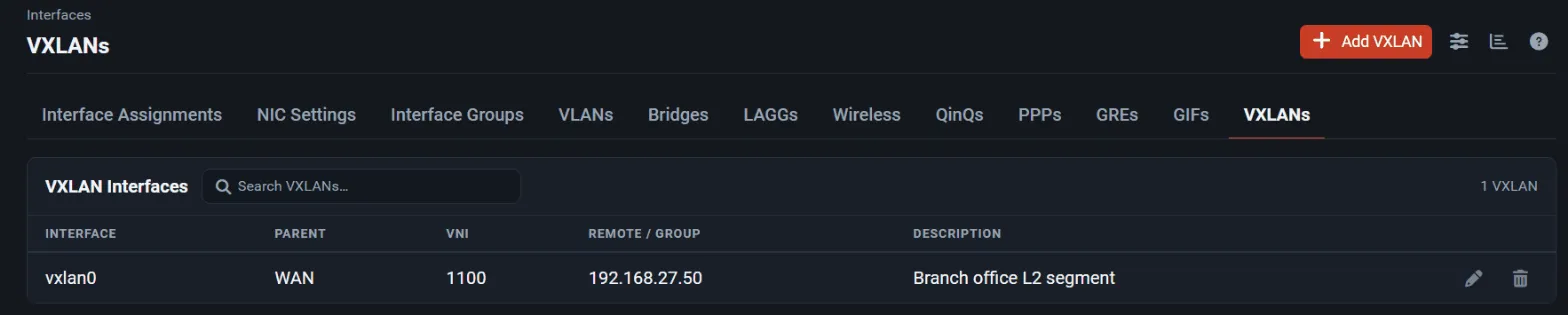
A VXLAN interface carries an Ethernet segment inside UDP packets between two or more VXLAN tunnel endpoints (VTEPs). Use it to stretch a Layer 2 segment across a routed network, for example to join a site LAN with a segment in a data centre or a cloud network. Every VTEP of a segment must use the same VXLAN Network Identifier (VNI).
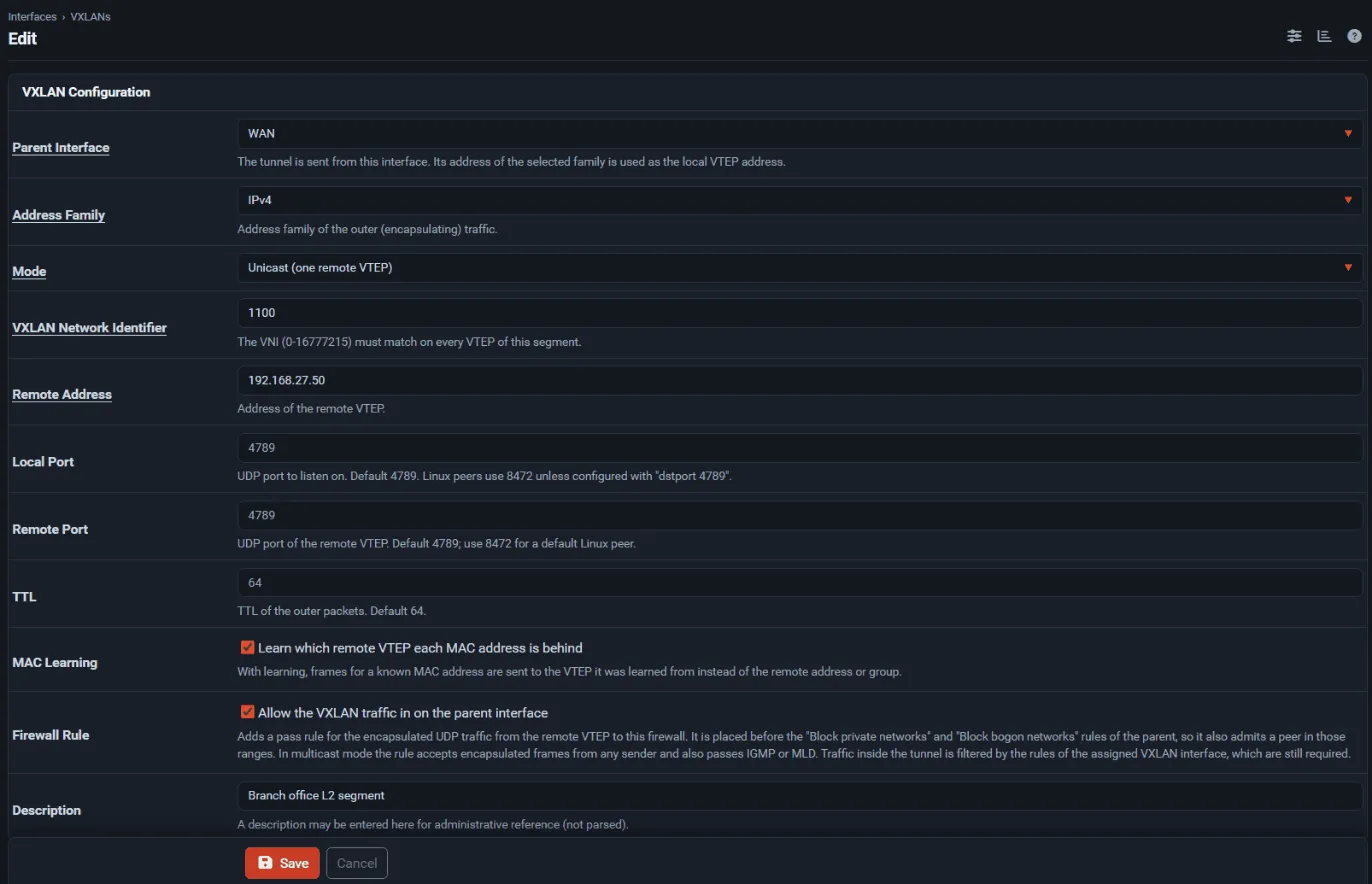
Create tunnels under Interfaces → Assignments → VXLANs. Each tunnel has:
- Parent Interface: the interface, or IP Alias or CARP virtual IP, the tunnel is sent from. Its address of the chosen family becomes the local VTEP address. The tunnel follows that address when it changes: a new DHCP or DHCPv6 lease, a new tracked IPv6 prefix, or an edited virtual IP, also when High Availability sync applies the edit on the secondary. A bridge that the VXLAN itself is a member of cannot be the parent.
- Address Family: IPv4 or IPv6 for the outer (encapsulating) traffic.
- Mode: Unicast sends to one Remote Address, which must be the address of another host:
unspecified, loopback, broadcast, IPv6 link-local, and the firewall’s own address are rejected.
Multicast group joins a Multicast Group on the parent interface and floods to every VTEP in
that group. IPv4 groups must be 224.0.1.0 or higher, and IPv6 groups must have site scope or wider
(for example
ff05::,ff08::,ff0e::), because link-local groups do not cross a router. - VXLAN Network Identifier: 0 to 16777215.
- Local Port and Remote Port: FreeSense listens on and sends to UDP 4789 by default. Linux
VTEPs use 8472 unless they are created with
dstport 4789, so set both ports to 8472 for a default Linux peer. All multicast tunnels of one address family share a single socket per local port, so their VNIs must differ even on different parents, and unicast and multicast tunnels of one family need different local ports. All IPv6 tunnels must also use the same local port, because FreeBSD accepts zero-checksum IPv6 UDP on one port only; IPv6 unicast and multicast tunnels therefore cannot be combined. The edit page enforces these rules. Over IPv6, a tunnel whose local and remote ports are equal sends zero UDP checksums (RFC 6935). Linux rejects those by default, so create a Linux peer withudp6zerocsumrx. - TTL: hop limit of the outer packets, 1 to 255, default 64.
- MAC Learning: on by default. With learning, frames for a known MAC address go directly to the VTEP it was learned from.
- Firewall Rule: optional automatic pass rule for the outer traffic; see Firewall rules.
FreeSense names the interface (vxlan0, vxlan1, …) when the tunnel is first saved and never reuses
a name that another tunnel owns.
A VXLAN keeps the same MAC address for its whole life, so switches and neighbours do not see a new address when the tunnel is recreated after a WAN address change. The edit page shows it. To use a different address, set it in the MAC Address field of the assigned interface.
If the kernel cannot start a tunnel, for example because the port is already in use, saving fails with an error and the previous settings stay in place. The reason is in the system log.
With a CARP virtual IP as the parent, or an IP Alias on one, the tunnel runs only on the node that is MASTER for that virtual IP. The BACKUP node keeps it down, so it does not flood its own segment to the remote VTEPs, and starts it when it becomes MASTER. Test a controlled failover before relying on it.
Assign, address, or bridge the tunnel
Section titled “Assign, address, or bridge the tunnel”Assign the VXLAN on Interface Assignments like any other interface. You can then give it an address and route over it, or add it to a bridge with a LAN interface to extend that segment. The VXLANs list shows which interface each tunnel is assigned as.
Removing a tunnel or its parent
Section titled “Removing a tunnel or its parent”A VXLAN cannot be deleted while it is assigned, a bridge or interface group member, a LAGG member, or the parent of a VLAN or QinQ. Remove those uses first. Likewise, an interface cannot be unassigned while a VXLAN is sent from it.
A virtual IP that a VXLAN, GRE, or GIF tunnel is sent from cannot be deleted, and it must remain an IP Alias or CARP address of the tunnel’s address family when it is edited. Changing its address is allowed; the tunnels follow it.
Encapsulation adds 50 bytes over IPv4 and 70 bytes over IPv6. Without an explicit MTU, the VXLAN interface uses the parent MTU minus that overhead, for example 1450 on a 1500-byte IPv4 WAN.
All members of a bridge share one MTU, so bridging a 1450-byte VXLAN with a LAN interface lowers the LAN to 1450 as well. Hosts on that segment then need the same MTU. To keep 1500 bytes inside the tunnel, the underlay path must carry at least 1550 bytes (1570 over IPv6): raise the parent MTU and set 1500 on the assigned VXLAN interface.
Firewall rules
Section titled “Firewall rules”Two sets of rules apply:
- Outer traffic on the parent interface: the UDP packets between VTEPs. Enable Allow the VXLAN traffic in on the parent interface on the tunnel, or add your own pass rule. The automatic rule passes UDP from the remote VTEP to the local address on the local port, and it comes before the parent’s Block private networks and Block bogon networks rules. A peer in a private range therefore still works with those options enabled. In multicast mode the rule passes the group and the firewall’s own address on the local port from any source, and also passes IGMP or MLD so the group membership stays up. On an internet-facing parent this lets any host that can reach that UDP port inject frames into the segment, so use multicast mode only on a trusted parent network.
- Inner traffic: the frames inside the tunnel are filtered by the rules of the assigned VXLAN interface. These rules are always required, even with the automatic outer rule. When the VXLAN is a bridge member, FreeSense filters bridged traffic on the member interfaces, so add rules on the VXLAN interface for traffic arriving from the remote site.
VXLAN has no encryption or authentication. Carry it over a trusted network, or inside an IPsec or WireGuard tunnel, when the path crosses the internet.
Troubleshooting
Section titled “Troubleshooting”- Check the tunnel parameters with
ifconfig vxlan0from Diagnostics → Command Prompt, and confirm the local address matches the parent address. - Use Diagnostics → Packet Capture on the parent interface with UDP port 4789 (or 8472) to confirm that encapsulated traffic arrives. Select the VXLAN view to decode the inner frames.
- If small packets pass but large transfers stall, the MTU is too large for the underlay path.
- Interfaces → Assignments → VXLANs marks a tunnel that does not currently exist. This usually
means the parent has no address of the selected family yet; the tunnel is created as soon as it gets
one. Otherwise the system log and
dmesgshow why the kernel rejected it.
Verify the result
Section titled “Verify the result”After each change, check Status → Interfaces for link state, media, and addresses, then test from one host on each segment: address assignment, DNS, gateway reachability, and that untrusted segments cannot reach the WebUI. Only then add broader firewall policy.