

WebUI menu reference
This reference lists the built-in entries of the FreeSense 1.1 WebUI top menu. The documentation names pages by their menu paths and field labels, so the paths here are the ones used throughout the manual, written as Menu → Entry → Tab.
How the menu works
Section titled “How the menu works”- The top bar holds Home (the dashboard), System, Interfaces, Firewall, Services, VPN, Status, Diagnostics, and Help.
- System, Services, Status, and Diagnostics open a grouped panel with a filter box; the other menus are a single column. An entry never moves to a different top-level menu.
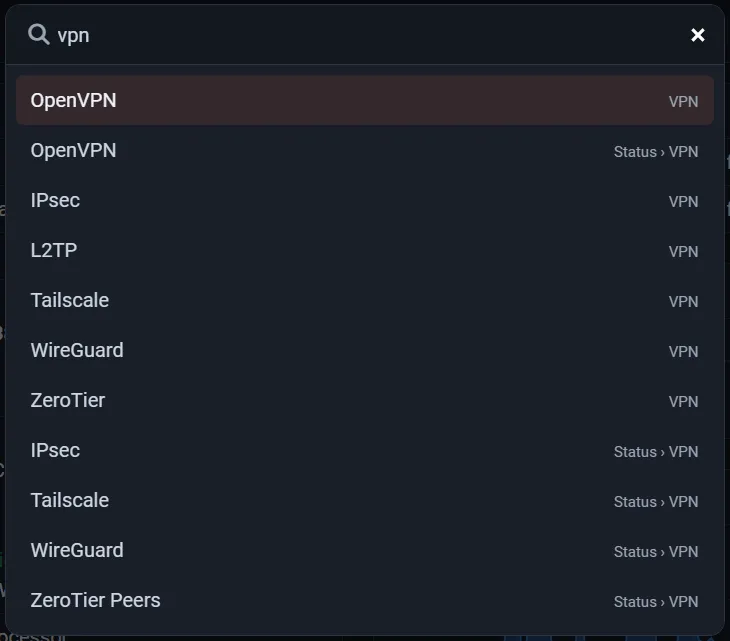
- Search in the top bar (or Ctrl+K) searches all menu entries.
- An entry appears only when your account has a privilege for the page it opens, so restricted users see a shorter menu than administrators.
- Many pages have a tab bar for related pages. When the tabs do not fit, the rest move into More.
- The Help menu may be labelled with the hostname instead, depending on the user setting for the hostname in the menu.
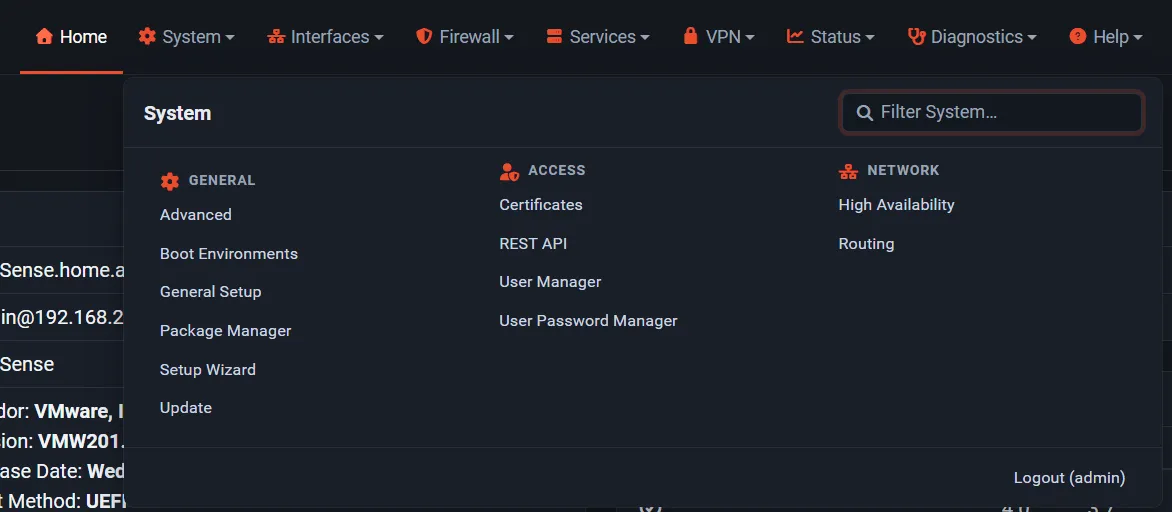
System
Section titled “System”| Group | Entries |
|---|---|
| General | Advanced, Boot Environments, General Setup, Package Manager, Setup Wizard, Update |
| Access | Certificates, REST API, User Manager, User Password Manager, User Settings (when custom user settings are enabled) |
| Network | High Availability, Routing |
| Other | Package pages that do not declare a group |
Tabs: Advanced (Admin Access, Firewall & NAT, Networking, Miscellaneous, System Tunables, Notifications), Boot Environments (Environments, Settings), Certificates (Authorities, Certificates, Revocation), Package Manager (Installed Packages, Available Packages, Repositories), REST API (Settings, Listeners, All Keys, My API Keys, Guide, API Explorer), Routing (Gateways, Static Routes, Gateway Groups), Update (System Update, Update Settings), User Manager (Users, Groups, Settings, Change Password, Authentication Servers). Logout is the last entry.
Interfaces
Section titled “Interfaces”Assignments and NIC Settings, then one entry per assigned interface (WAN, LAN, OPT1, …). The Interfaces tab bar has Interface Assignments, NIC Settings, Interface Groups, VLANs, Bridges, LAGGs, Wireless, QinQs, PPPs, GREs, GIFs, and VXLANs. If the WebUI is set not to allow interface assignment, only the per-interface entries are listed.
Firewall
Section titled “Firewall”Aliases (IP, Ports, URLs, All), NAT (Port Forward, 1:1, Outbound, NPt), Rules, Schedules, Traffic Shaper (By Interface, By Queue, Limiters, Wizards), Virtual IPs.
Services
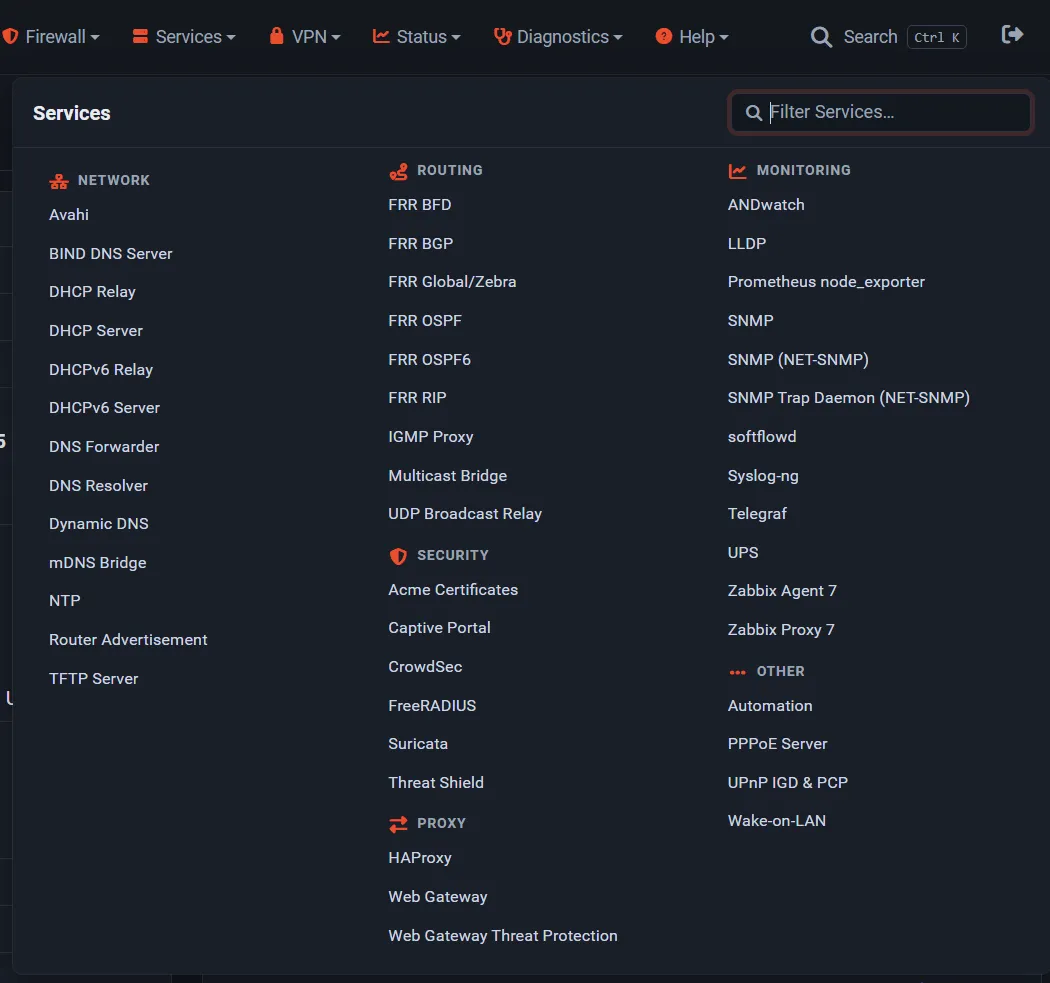
Section titled “Services”| Group | Built-in entries |
|---|---|
| Network | DHCP Relay, DHCPv6 Relay, DHCP Server, DHCPv6 Server, DNS Forwarder, DNS Resolver, Dynamic DNS, NTP, Router Advertisement |
| Routing | IGMP Proxy |
| Security | Captive Portal |
| Proxy | (packages only) |
| Monitoring | SNMP |
| Other | PPPoE Server, UPnP IGD & PCP (only with more than one interface), Wake-on-LAN |
IPsec (Tunnels, Mobile Clients, Pre-Shared Keys, Advanced Settings), L2TP (Configuration, Users), OpenVPN (Servers, Clients, Client Specific Overrides, Wizards).
Status
Section titled “Status”| Group | Built-in entries |
|---|---|
| Overview | Filter Reload, Gateways, Interfaces, REST API, Services, System Logs |
| Network | CARP (failover), DHCP Leases, DHCPv6 Leases, DNS Resolver, NTP, UPnP IGD & PCP (only with more than one interface), Wireless (when a wireless interface exists) |
| VPN | IPsec, OpenVPN |
| Security | Captive Portal |
| Traffic | Queues, Traffic Graph |
System Logs has tabs for System, Firewall, DHCP, Authentication, IPsec, PPP, PPPoE/L2TP Server, OpenVPN, NTP, Packages, and Settings.
Diagnostics
Section titled “Diagnostics”| Group | Entries |
|---|---|
| Network Tools | DNS Lookup, Packet Capture, Ping, Test Port, Traceroute |
| Tables & State | ARP Table, Limiter Info, NDP Table, pfInfo, pfTop, Routes, Sockets, States, States Summary, Tables |
| System | Authentication, Backup & Restore, Command Prompt, Edit File, GEOM Mirrors (with a GEOM mirror), S.M.A.R.T. Status, System Activity |
| Power & Reset | Factory Defaults, Halt System, Reboot |
Backup & Restore has the tabs Backup & Restore, Configuration History, and Remote Backup.
About this Page, Bug Database, Documentation, FreeBSD Handbook, Source Code, and User Forum. About this Page opens the documentation topic for the current screen; see the WebUI context-help map.
Where packages appear
Section titled “Where packages appear”Optional Packages add entries to the menu that matches their purpose; there is no separate packages menu. Inside a grouped menu, a package entry uses the group its package declares, or a group chosen from its name (for example Threat Shield and Suricata under Services → Security, HAProxy and the Web Gateway under Services → Proxy, WireGuard, Tailscale, and ZeroTier status pages under Status → VPN). Entries are sorted alphabetically within each group. Some packages also add a tab to a built-in page, such as Client Export on VPN → OpenVPN.
The package catalog lists each package’s configuration and status pages. Contributors can find how entries are defined, grouped, and filtered in the WebUI menu system.