

ZFS boot environments
A boot environment is a bootable copy of the complete system: the base system, installed packages,
the package database, and the configuration under /cf. FreeSense uses boot environments to protect
upgrades and to let you keep known-good system states. They complement configuration backups:
restoring config.xml restores settings, while a boot environment holds the system files that run
them.
Boot environments need a ZFS installation. UFS installations upgrade in place. If the system can’t use boot environments, System → Boot Environments says so and offers no actions.
How upgrades use boot environments
Section titled “How upgrades use boot environments”When Snapshots is enabled under System → Boot Environments → Settings (the default), a System upgrade on ZFS runs like this:
- Prune. Older automatically created environments are removed until at most Environments to keep minus one remain. The new upgrade then brings the count back to the limit. Manual, current, next-boot, one-time, and pending environments are never removed.
- Check space. The pool must have at least 2 GiB or 15 percent of its capacity free, whichever is larger. If not, the upgrade stops before changing anything and reports that there isn’t enough ZFS pool space for a safe boot environment upgrade.
- Clone. The running environment is renamed with a timestamp suffix, for example
default_20261013060000. A clone of it is created under the original name. - Upgrade the clone. Packages are upgraded inside the clone only. The running system isn’t changed. Package scripts that must run on the new system are deferred to its first boot.
- Mark it pending. The clone is recorded as an automatic environment with health Pending and a link to the pre-upgrade environment as its rollback target. The boot code is updated.
- Activate once and reboot. The clone is activated for the next boot only, and the system reboots. The pre-upgrade environment stays the persistent default until the clone passes its health check.
If the system has less than 1 GB of free memory, the upgrader limits ZFS caching while it works.
The pre-upgrade environment (the one with the timestamp suffix) is the emergency recovery point for that upgrade. See Recovering from a failed upgrade.
First-boot health check and automatic rollback
Section titled “First-boot health check and automatic rollback”On the first boot of an upgraded environment, the freesense_be_health service checks every 20
seconds that:
/cf/conf/config.xmlis well-formed XML,- the WebUI’s PHP-FPM service is running,
- the packet filter has its rules loaded, and
- the deferred package scripts have finished.
The checks are local on purpose. WAN connectivity, DNS, gateways, CARP state, and Optional Package services don’t decide whether the boot succeeded.
| Result | What happens |
|---|---|
| Three consecutive checks pass | The environment is activated persistently and marked Healthy. |
| The Health timeout expires first (default 300 seconds) | The environment is marked Failed, the pre-upgrade environment is activated, and the system reboots into it. |
FreeSense attempts an automatic rollback only once per upgrade, so a failing environment can’t cause a reboot loop. If Rollback is turned off in the settings, the new environment is accepted as soon as it starts, without waiting for the checks. Use that only while you diagnose first-boot behaviour.
Because the upgraded environment is activated for one boot only, a system that stops before the health check runs, for example with a kernel panic, starts the pre-upgrade environment again on the next power cycle.
Manage boot environments
Section titled “Manage boot environments”Open System → Boot Environments. The Environments tab lists every boot environment:
| Column | Shows |
|---|---|
| Environment | The name, its description, and a marker on the running environment |
| State | Current (running now), Next (persistent default), Once (used for the next boot only) |
| Health | Healthy, Pending, or Failed for upgrade environments |
| Version | The FreeSense version installed in the environment |
| Created | When the environment was created |
| Space | Space the environment uses in the pool |
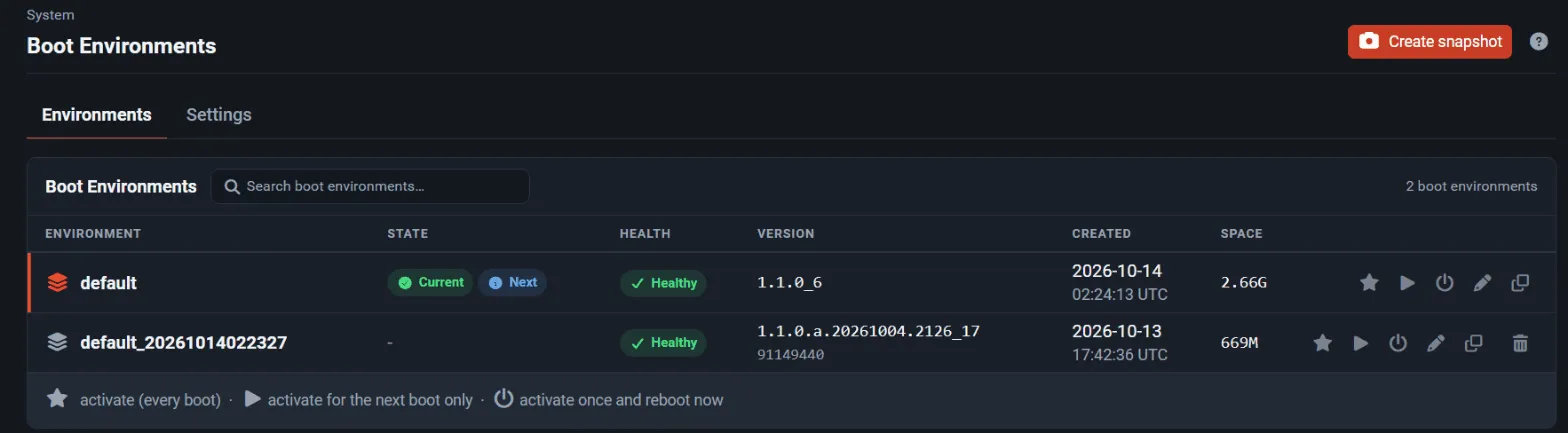
Create a boot environment
Section titled “Create a boot environment”- Select Create snapshot in the page header.
- Enter an Environment name: letters, digits,
.,_, and-, up to 64 characters. For example,before-firewall-change. - Select Create snapshot.
The new environment is a copy of the running system and is marked as manual, so automatic pruning never removes it.
Row actions
Section titled “Row actions”| Action | Effect |
|---|---|
| Activate persistently (star) | Boot this environment on every boot from now on. |
| Activate once (play) | Boot this environment on the next boot only. |
| Activate once and reboot | Same as activate once, then reboot immediately after you confirm. |
| Edit | Change the name and description in one dialog. The running environment and a pending environment can’t be renamed. |
| Clone | Create a new environment from this one. Choose the source and the new name in the dialog. |
| Delete | Remove the environment after you confirm. |
The current, next-boot, one-time, and pending environments can’t be deleted. Before risky maintenance, create a clearly named environment and also save a configuration backup off the appliance.
Settings
Section titled “Settings”The Settings tab, section Upgrade Protection:
| Setting | Default | Meaning |
|---|---|---|
| Snapshots | On | Create boot environments automatically during upgrades. Off makes ZFS systems upgrade in place. |
| Rollback | On | Roll back automatically when the first boot after an upgrade fails its health check. |
| Environments to keep | 3 | Number of automatically created environments to keep (1 to 10). Older ones are removed, oldest first. |
| Health timeout | 300 | Seconds to wait for a successful first-boot health check (60 to 900). |
Command line and REST API
Section titled “Command line and REST API”The same operations are available as root with /usr/local/sbin/freesense-be, which prints JSON:
freesense-be listfreesense-be create before-firewall-changefreesense-be describe before-firewall-change "Before rule cleanup"freesense-be activate-once before-firewall-changeOther commands are status, clone, rename, destroy, and activate. The REST API exposes
boot environments at /api/v1/system/boot-environments. See the REST API overview.
Recovering from a failed upgrade
Section titled “Recovering from a failed upgrade”Upgrades are one-way. FreeSense doesn’t support downgrading to an older release, and the updater never offers one.
The pre-upgrade environment is kept as an emergency recovery point immediately after a failed upgrade. If the automatic rollback didn’t run, or the upgraded system starts but doesn’t work:
- Restart the system with console access.
- In the boot loader menu, open the boot environment selection and choose the pre-upgrade environment (the name with the timestamp suffix).
- After the system starts, check pool health and the upgrade log before you try the upgrade again.
Selecting an older environment this way is only for recovery right after a failed upgrade. It isn’t a supported way to go back to an older release. After an upgraded system has been running, its configuration may have changed in ways the older release doesn’t understand. Don’t delete the recovery environment until the upgraded environment is marked Healthy and you have confirmed that the system works.
For upgrades from 1.0, see Upgrading from 1.0.
ZFS Storage dashboard widget
Section titled “ZFS Storage dashboard widget”Add ZFS Storage to the dashboard from the available widgets. It shows pool health, capacity, fragmentation, scrub or resilver status, device error counters, and the current boot environment. An unhealthy pool or device errors create a persistent WebUI notice.
Investigate a degraded pool before you upgrade or delete boot environments. All boot environments share the same pool, so they don’t replace backups stored on another device.
Release lines
Section titled “Release lines”Boot environment handling works the same on Stable and Development. Each environment records the installed FreeSense version, which makes it easier to identify a recovery point. Selecting a different update channel doesn’t make going back to an older release safe. See Updates and release channels.