

Updates & release channels
FreeSense updates are package-based. System updates are installed from the official signed repositories through System → Update or the console menu option 13) Update from console. Repository signatures and package fingerprints are verified before anything is installed.
The update check is a public, unauthenticated HTTPS read from pkg.freesense.org. It fetches the
signed channel manifest, the repository metadata, and the packages it installs, and the release
document for the update notes. It sends no device identifier, configuration, telemetry, or usage
report. Requests identify only as FreeSense/<version>.
Release channels
Section titled “Release channels”| Channel | Release line | Intended use | Support |
|---|---|---|---|
| Stable | 1.1.x: 1.1.0 and later patch releases such as 1.1.1 | Production and normal use | Supported |
| Testing | Nightly builds of the next 1.1 patch, for example 1.1.10 before its release | Trying Stable fixes before they are released, on test systems | Pre-release; no support |
| Development | Rolling 1.2 builds, rebuilt nightly | Contributors, integration testing, disposable labs | Experimental; no support |
Stable advances only through tagged releases built from a sealed release lock. Fixes that are needed on Stable are published as patch releases. FreeSense 1.1.0 replaced the 1.0.x line; 1.0.x releases stay published, but ordinary fixes are not backported to them. Read Upgrading from 1.0 to move a 1.0 firewall.
Testing (shown as FreeSense 1.1 Testing) follows the 1.1 maintenance branch: every fix that is
lined up for the next Stable patch, built every night as that patch number. On a Testing system
System → Update shows a version such as 1.1.10.a.20261017.1200_3. When that patch is released
on Stable, Testing moves on to the next patch number. Testing publishes no installer images; install
Stable and then switch.
Development receives current 1.2 work every night. A Development build that passed its signature, integrity, and boot checks is still experimental: verification proves the artifact is the one the project built, not that it is suitable for production. See the Development line.
Stable is published for amd64 and, starting with 1.1.1, for generic arm64 (UEFI installer image). FreeSense 1.1.0 itself was amd64 only. The Raspberry Pi appliance images are Development-only.
Check for and install updates
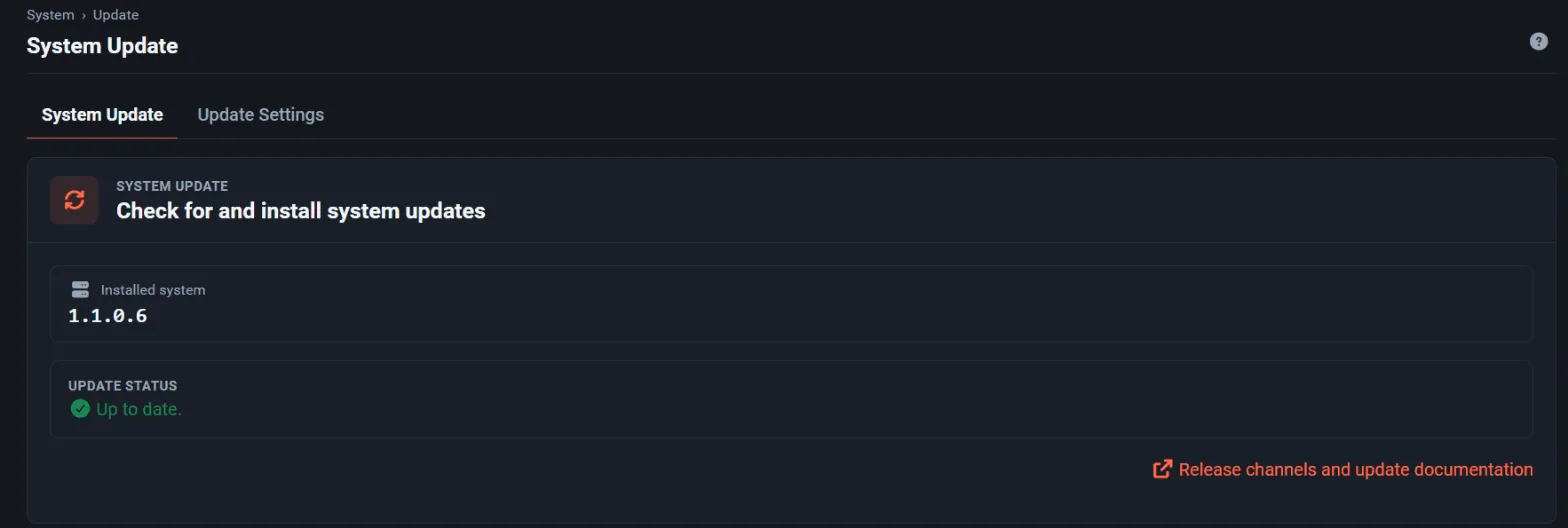
Section titled “Check for and install updates”- Open System → Update. The System Update tab shows the Installed system version, the
Available system version when a newer one exists, and the update status. From 1.1.3 versions
are shown as the release (
1.1.3); the full package version, such as1.1.3_4, is in the tooltip. Two Development builds of the same release show as1.2.0 (build N). - Read the What is new panel, which lists the changes from the channel’s release document: base-system and System package commits, Optional Packages commits (from 1.1.3), and notes the release names itself. A release without base-system changes says so and links to the release notes in this documentation.
- Select Install update. The page is locked behind a progress window with the from and to versions, what the updater is doing now (for example “Fetching FreeSense-base”), a progress bar and an elapsed timer; Show details shows the updater output. From 1.1.5 the window opens at once and follows the updater, which runs on its own; reloading the page reattaches to it. Leaving the page asks for confirmation.
- The firewall reboots to finish the update.
On a ZFS installation the update runs in a cloned boot environment with a first-boot health check and one automatic rollback; on UFS it runs in place. The upgrade guide describes both, and ZFS boot environments covers the settings.
The dashboard update check
Section titled “The dashboard update check”The System Information dashboard widget asks the updater whether the selected channel has a newer system. In 1.1 the check looks only at the selected channel and never offers another channel. (On 1.0.x the dashboard check could wrongly report “up to date”; use System → Update on those systems.) To turn the dashboard check off, select Disable the dashboard auto-update check under System → Update → Update Settings.
Switch channels
Section titled “Switch channels”Select the channel in Branch under System → Update → Update Settings, save, and check for updates on the System Update tab.
The list offers only channels whose release is the same as or newer than the running release:
| From | To | Allowed |
|---|---|---|
| 1.0.x Stable | 1.1 Stable | Yes, the normal upgrade path. One-way. |
| 1.1 Stable | 1.1 Testing | Yes. |
| 1.1 Testing | 1.1 Stable | Only once Stable has released the patch Testing is on (for example 1.1.10). Until then Stable would be a downgrade and is not listed. |
| 1.1 Stable or Testing | 1.2 Development | Yes, but one-way and unsupported. |
| 1.2 Development | 1.1 Stable or Testing | No |
| 1.1 (any channel) | 1.0 | No |
A 1.0.x system also lists 1.1 Testing. Upgrade 1.0 systems to 1.1 Stable instead.
A channel that would downgrade the running system is not listed, and the page refuses it with “That firmware branch would downgrade the running system and cannot be selected.”
Recovery is not a downgrade
Section titled “Recovery is not a downgrade”Upgrades are one-way. On ZFS, the pre-upgrade boot environment is kept as an emergency recovery point right after a failed upgrade. The health check uses it for the automatic rollback, and it can be selected from the boot loader menu if an upgraded system is unusable. It is not a supported way to return a working system to an older release or channel: the updater does not maintain it as a 1.0 system, and changes made after the upgrade are not in it.
To run an older release or the Stable channel again after moving to Development, reinstall from that release’s installer and restore a configuration backup taken on a compatible release. UFS installations have no boot environments; recovery from a failed UFS upgrade is a reinstall and restore.
System and optional packages update independently
Section titled “System and optional packages update independently”The System and the optional packages are built and published from separate repositories with independent input fingerprints. A System-only change does not rebuild optional packages. Optional packages rebuild when their sources or build configuration change, or when the pinned FreeBSD platform changes. Each channel always points at a verified System and optional-package pair. See Release process.
Release documents and installer locations
Section titled “Release documents and installer locations”Installer and disk images live at immutable versioned URLs on downloads.freesense.org. Each
channel has a small release document on pkg.freesense.org:
https://pkg.freesense.org/v1/releases/stable.jsonhttps://pkg.freesense.org/v1/releases/devel.json
The release pipeline publishes the images and verifies their public checksums and sizes before it updates the matching document. The download page reads these documents live. Publishing Development never changes Stable, and publishing Stable never changes Development.