

Custom package repositories
System → Package Manager → Repositories lists every source the firewall gets packages from, and lets you add your own. Use it when you need software that the FreeSense catalog doesn’t offer, either from FreeBSD’s package repository or from a repository you or a vendor run.
Custom repositories are a standard feature of FreeSense 1.1 Stable.
What the Repositories tab lists
Section titled “What the Repositories tab lists”| Row | Priority | Can you change it? |
|---|---|---|
| FreeSense: FreeSense system | 100 | No. It is built in, signed and locked. |
| FreeSense-packages: FreeSense optional packages | 50 | No. It is built in, signed and locked. |
| FreeSense-mirror: FreeSense mirror (when configured) | 10 | No. It is built in, signed and locked. |
| FreeBSD-ports: FreeBSD optional packages, rolling latest branch | 0 | You can turn it on or off. It is off by default. |
| Your custom repositories, up to five | 5 down to 1 | You can add, edit, reorder, disable and delete them. |
The built-in rows show the address and priority from the system’s repository configuration. Each custom row shows its Address, its Verification (Fingerprint, Public key or Unsigned), its Priority and whether it is Enabled.
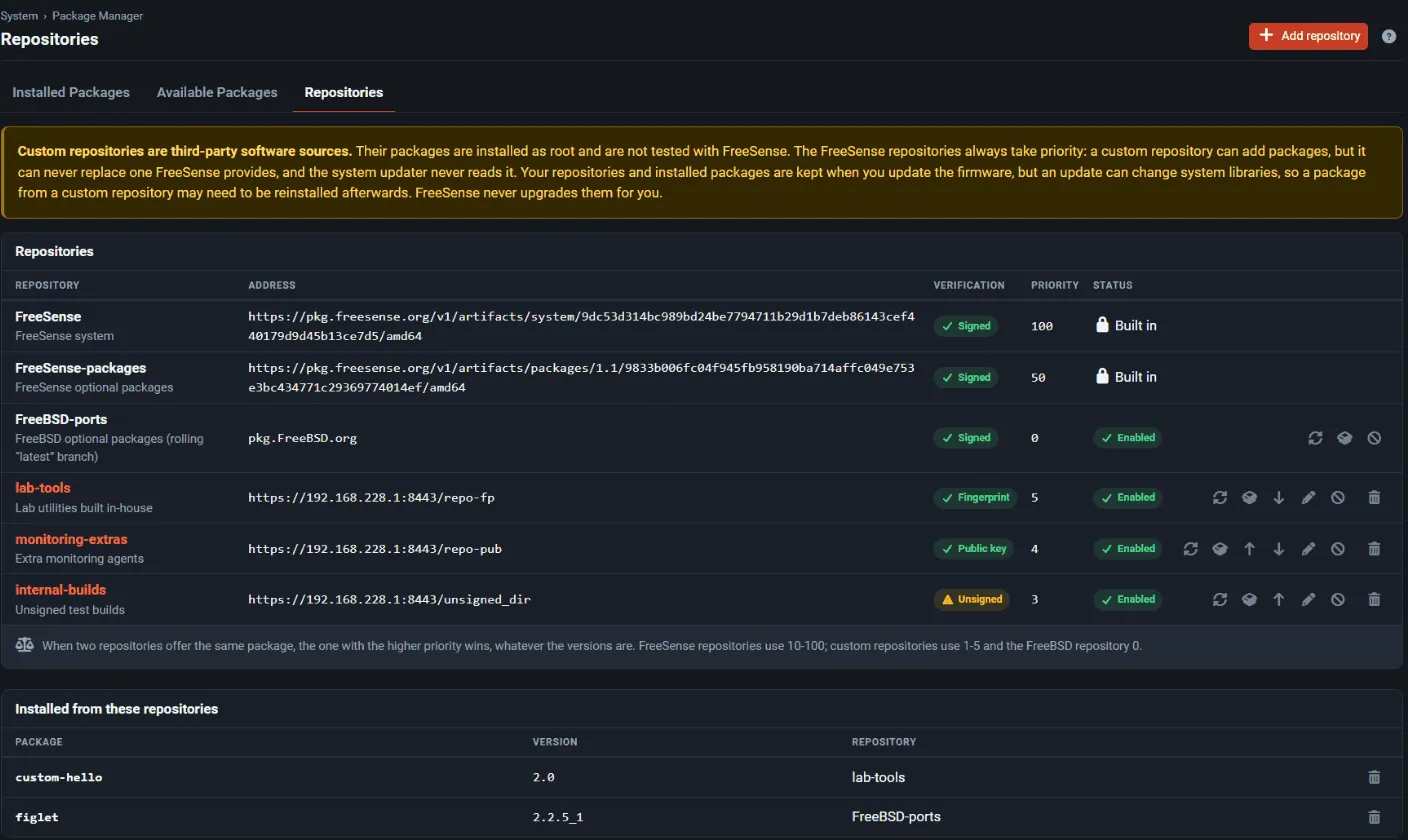
When the FreeBSD repository is enabled, only its main package repository is used. FreeBSD’s kernel-module repository stays off, because those modules are built for FreeBSD’s kernel, not the FreeSense kernel.
Priorities: FreeSense always wins
Section titled “Priorities: FreeSense always wins”If two repositories offer a package with the same name, pkg installs it from the repository with the higher priority, whatever the version numbers are. FreeSense fixes the priorities so that its own repositories always come first:
- FreeSense repositories: 10 to 100
- custom repositories: 5 for the first one in the list, 4 for the second, and so on down to 1
- FreeBSD-ports: 0
You can’t type in a priority. To change the order of your custom repositories, use the up and down arrows on their rows. The repository at the top of the list has the highest custom priority. A custom repository can add packages, but it can never replace a package that FreeSense provides.
Add a repository
Section titled “Add a repository”-
Go to System → Package Manager → Repositories and choose Add repository. The button is hidden once you have five custom repositories.
-
Fill in the Repository section:
Field Rules Enable Use this repository. On by default. Name (required) 2–32 characters: lowercase letters, digits, -and_, starting with a letter. Names starting withfreesenseorfreebsdare reserved. Must be unique.Description Optional, up to 120 characters. Address (required) An https://URL with no user name, password, query or fragment. Plainhttp://is refused. Point it at the repository folder for FreeBSD:16:amd64, the folder that holdsmeta.conforpackagesite.pkg. Example:https://pkg.example.com/FreeBSD:16:amd64/latest. -
Fill in the Verification section. Signed with offers three choices:
Choice What to enter in Key A fingerprint of the repository key (recommended) The SHA-256 fingerprint of the repository’s public key: 64 hexadecimal digits. You can also paste a pkg fingerprint file ( function: "sha256"/fingerprint: "…").The repository public key The repository’s PEM block, from -----BEGIN PUBLIC KEY-----to-----END PUBLIC KEY-----. Certificates and private keys are refused.Nothing: unsigned No key. You must also tick Unsigned: I understand an unsigned repository cannot be verified: anyone who can alter it, or the connection to it, can install code on this firewall. When you edit a repository later, its public key is not shown. Leave Key blank to keep the stored key.
-
Choose Save. The page confirms that the repository was saved and asks you to fetch its package list.
-
Choose Refresh on the repository’s row to download the package list. A repository whose signature doesn’t verify fails the refresh with an error.
-
Choose Browse on the row to search its packages. The list shows up to 300 at a time, and the search narrows it down.
Disable keeps a repository’s settings but stops pkg from using it. Delete removes the repository and its cached package list. Packages already installed from it stay installed.
The FreeBSD repository row has a toggle to turn it on or off, plus Refresh and Browse while it is enabled.
Install, update and remove packages from other sources
Section titled “Install, update and remove packages from other sources”Packages from custom repositories and from FreeBSD-ports use the same Package Installer as FreeSense packages, with an extra safety review:
- From Repositories → Browse, choose Review and install on a package.
- On Available Packages and Installed Packages, set the Source filter to a repository. Available Packages then lists that repository’s packages, up to 300 at a time. Typing in the search box searches the whole repository, which is how you find a package among the tens of thousands that FreeBSD offers. The rows offer Install, Update and Remove.
- The Installed from these repositories panel on the Repositories tab lists every package that came from a non-FreeSense repository, with a Remove action.
The review page says the package comes “From a package repository that is not part of FreeSense”. It warns that the package isn’t tested with FreeSense, is installed as root, is never upgraded automatically, and may need reinstalling after a firmware update. It also lists the packages that would be installed or changed, with their versions and repositories.
The dry-run guard
Section titled “The dry-run guard”Before the Install, Update or Remove button becomes active, the Package Installer asks pkg what
it would do (pkg install -n, pkg upgrade -n or pkg delete -n). It refuses the operation
if the plan would:
- upgrade, downgrade or reinstall a package that is already installed. The one exception is an explicit Update of a package from its own repository, which may change only that package;
- remove an installed package;
- supply a package that the FreeSense repositories already provide;
- install a name reserved for FreeSense and the base system:
FreeSense*,FreeBSD*,php*-FreeSense*,php8*,pkg,pkg-*andkernel*.
A removal is also refused if the package didn’t come from a custom repository, or if removing it would take a FreeSense package with it. The reasons are listed on the review page, and the confirm button stays disabled. The plan is checked again just before the operation runs.
Every operation saves a configuration restore point first, just like an official package install.
Upgrader isolation
Section titled “Upgrader isolation”Custom repositories can never affect a FreeSense system update:
- Their pkg configuration is generated into
/usr/local/etc/pkg/custom-repos, and their keys into/usr/local/etc/pkg/custom-keys. Neither is one of the system’s repository directories. - FreeSense-upgrade, which handles the update check, the system update and official package
installs, pins pkg to the system repository directories (
/etc/pkg/and/usr/local/etc/pkg/repos/). It never reads, refreshes or installs from a custom repository, so a system update can’t pull a core package from a third party. - The WebUI’s own package operations, such as the Available and Installed lists and installs of official packages, also use only the FreeSense repositories. Only the custom-repository actions ask pkg to include the custom directory.
From the shell
Section titled “From the shell”The system’s pkg.conf adds the custom directory to pkg’s repository search path, so running
pkg from the console or SSH sees your custom repositories (run pkg update first). Keep in
mind:
- shell installs skip the dry-run guard above;
- the fixed priorities still apply, so FreeSense repositories win when names clash;
- FreeSense-upgrade still ignores custom repositories, even when you start it from the shell.
Firmware updates and backups
Section titled “Firmware updates and backups”- The repository list is stored in the configuration (
config.xml), so it is part of every configuration backup and survives firmware updates and restores. The pkg files are rebuilt from the configuration each time the firewall starts its packages. - Packages installed from custom repositories stay installed across a firmware update. FreeSense never upgrades them for you. A firmware update can change system libraries, though, so a package built for the old ones may need reinstalling. Use Refresh, then reinstall or update the package when you choose to.
The Source column
Section titled “The Source column”Available Packages and Installed Packages both have a Source column and filter:
- FreeSense’s own packages are marked Official: A FreeSense package from the signed FreeSense repository. Both lists open showing only these.
- Packages from other repositories show the repository’s name: From the … repository, not tested with FreeSense.
- The tiles at the top of both pages count official packages only.
REST API
Section titled “REST API”The Repositories tab has REST API equivalents. Paths are relative to https://<firewall>/api.
See the API overview for authentication.
| Method and path | Purpose |
|---|---|
GET /v1/packages/repositories |
Built-in, FreeBSD and custom repositories with their priorities and limits. Keys are never returned, only key_set. |
POST /v1/packages/repositories |
Add a custom repository |
PUT /v1/packages/repositories/{id} |
Change one. Omitted fields, and an empty key, keep their stored values. |
DELETE /v1/packages/repositories/{id} |
Delete one. Packages installed from it stay. |
POST /v1/packages/repositories/{id}/refresh |
Fetch its package list. Returns 502 if the fetch or signature check fails. |
GET /v1/packages/repositories/{id}/packages |
List its packages. id can also be freebsd. ?q= filters by name or description, and at most 300 are returned. |
PUT /v1/packages/freebsd-repository |
Turn FreeBSD-ports on or off with {"enable": true} or {"enable": false} |
The request body for adding or changing a repository takes name, descr, url,
signature_type (fingerprints, pubkey or none), key, enable, and ack_unsigned, which
is required when signature_type is none. The same validation rules apply as on the page.
The write routes need the packages write scope.
The API manages repositories only. You can’t install packages from custom repositories through the API. Use the WebUI, where the dry-run guard runs.
Risks and support boundary
Section titled “Risks and support boundary”- Support. FreeSense supports the catalog packages from its own repositories. Packages from custom repositories or FreeBSD-ports are outside that support. When you report a problem, say which non-official packages are installed, and try to reproduce the problem without them.
- Compatibility. FreeSense 1.1 is built on a FreeBSD 16.0-CURRENT snapshot. Packages must be
built for
FreeBSD:16:amd64. FreeBSD’s rolling latest packages can move ahead of the FreeSense platform pin, so a package or its shared libraries may not match the installed system. - Security. A repository with no signature, or a key you didn’t verify independently, lets anyone who controls the server or the connection run code on your firewall. Get fingerprints through a separate trusted channel.
- Attack surface. Every extra daemon is extra code running as root on the firewall. Install only what you need, and don’t expose its services on WAN interfaces unless you have to.
- Recovery. If a third-party package breaks something, remove it from Installed from these repositories, or restore a configuration backup and remove it from the shell.